
 Glide rebalance vs pro-rata
How to use this case study
New to the Learning Center, or want a map of the panels? Start with a tour: Reading Lesson (Getting Around) or Screencast Lesson (Getting Around) — both walk through Tutilis next to a live planThe running Tutilis product next to this lesson — navigation, Bird's Eye, Forecaster, tools, and more — loaded with a teaching sample. A dossier is the plan data; the live plan is the full product surface with a sample dossier already open so you can explore. On the web, teaching samples are not editable the way your own dossier will be in the full app.Full entry → (to the right on a desktop-width screen, or below when stacked on a tablet).
This page — Glide rebalance vs pro-rata — includes a live sample planThe running Tutilis product next to this lesson — navigation, Bird's Eye, Forecaster, tools, and more — loaded with a teaching sample. A dossier is the plan data; the live plan is the full product surface with a sample dossier already open so you can explore. On the web, teaching samples are not editable the way your own dossier will be in the full app.Full entry → next to the text. On a wide screen it usually sits to the right of the text; on a tablet it usually sits below. Use the text for the walk-through, then try the same ideas in the live plan.
The live planThe running Tutilis product next to this lesson — navigation, Bird's Eye, Forecaster, tools, and more — loaded with a teaching sample. A dossier is the plan data; the live plan is the full product surface with a sample dossier already open so you can explore. On the web, teaching samples are not editable the way your own dossier will be in the full app.Full entry → next to this page — usually to the right on a wide screen, or below on a tablet — is Tutilis running a teaching sample: the same financial planning product available as a desktop application (early preview). A dossierYour full plan in Tutilis: the people in the household, what they own and owe, cash flows in and out, tax setting, and planning assumptions. One dossier is one complete situation as the product models it.Full entry → is the plan data; the live plan is the full product (navigation, Bird's Eye, Forecaster, tools) with a sample dossier already open so you can try the panels. See planned pricing. On the web, Learning Center samples are not editable the way your own dossier will be in the full app. Your own household goes in the Tutilis desktop app — the Learning Center front page has a short clip of that.
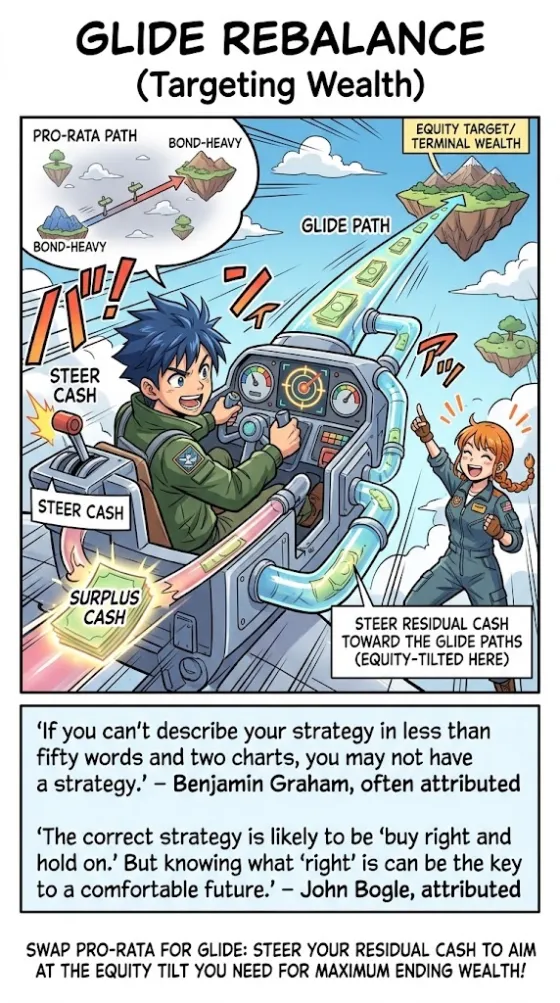
A glide pathA planned shift in allocation over time — classically toward bonds as retirement approaches, so risk comes down as the years available to recover from a loss come down with it. The word that matters is *planned*: a portfolio drifting toward whatever has been winning is not on a glide path, it is unrebalanced.Full entry → is a target mix of stocks, bonds and cash that changes over the years. You write it down once, and when the withdrawal strategy is Glide rebalanceSelling some of what grew and buying what lagged, to bring the mix back to the target you chose. Without it a portfolio quietly drifts toward whatever has been winning, and gets riskier than intended precisely when it feels safest.Full entry →, every year's leftover cash and every year's shortfall are steered toward it. Under the default strategy, Pro-rata, the plan sells and invests in proportion to what it already holds, so whatever mix it starts with tends to stay. This lesson compares Glide rebalance vs pro-rata withdrawals on one plan.
This lesson's plan starts with far more in bonds than in stocks and carries a target that leans the other way. That gap is what the lesson is about. You will find where the target is set, read it, and then switch the strategy to see what following it does to the forecast.
This is the sibling of Tax-account order vs pro-rata. Both lessons change the same control, the withdrawal strategy, and each sample is built so that one switch is easy to read.
The live plan on the right is Springfield Glide (springfield_glide). Success is judged as Silver unless you change it, as explained in What does success mean?.
Homer was born in 1965. He works until he retires at 65 in 2030, claims Social Security at his full retirement age of 67, and the plan runs until he is 90. His savings sit in one taxable brokerageAn ordinary taxable investment account — no special retirement wrapper, no contribution limit, and no withdrawal age rules. The trade-off is that dividends and realized gains are taxed as they happen rather than deferred. Often called the taxable bucket next to traditional and Roth.Full entry → account that holds two funds: Growth Equity, which grows like the US stock market, and Ballast Bond, which grows like intermediate Treasuries. The bond fund is more than five times the size of the stock fund. His living expenses continue through the end of the plan.
The plan's withdrawal strategy is Pro-rata. Each year it sells from, or invests in, both funds in proportion to their size, so the portfolio stays mostly bonds for as long as the plan runs.
The plan also carries a glide path that it does not use yet. The target is 75% stocks and 25% bonds through retirement, and it then moves in a straight line to 50/50 by the year Homer turns 90. The table at the foot of this lesson lists every setting, the target included.
The target lives under the Money movement strategy in  AssumptionsA main-rail area. The rules the forecast runs under — growth, taxes, movements, success definition, locality, currency. Read and write.. Select Glide rebalance and the Glide path target grid appears beneath it. A plan that already has a target shows the grid under any strategy, with a note when the strategy will not read it.
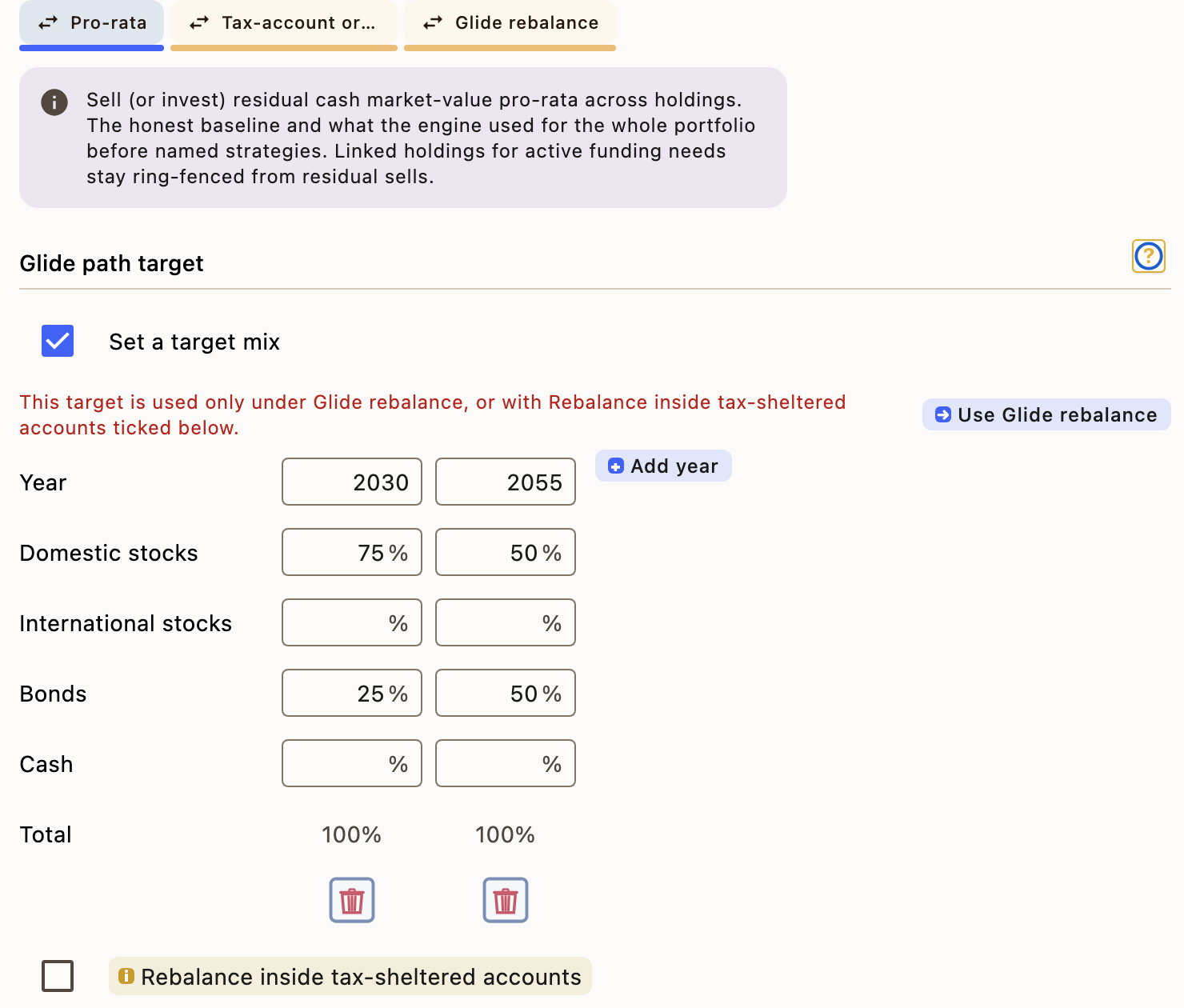
Springfield Glide's target under the Money movement strategy. The plan is on Pro-rata, so the target is stored but not read, and the note beside it says so.
The grid has one column per year and one row per kind of investment: domestic stocks, international stocks, bonds and cash. Each column says how the portfolio should be split in that year, and it should add up to 100%. The total under each column turns red when it does not, and Normalize shares scales every such column back to 100%.
- Set a target mix turns the target on. A new target starts with one column for this year, filled in with what the plan holds today. Unticking it deletes the target, every column and the box under the grid, so it asks first.
- Add year adds a column ten years after the last one, with the same mix, which you then edit.
- The bin under a column removes it.
Between two columns the target moves in a straight line. Before the first column the first column's mix applies, and after the last column the last one's does. Springfield Glide has two columns, 2030 and 2055, so its target is 75/25 every year up to 2030 and reaches 50/50 in 2055.
The target is stated by kind of investment, and Tutilis decides which kind each fund is from the growth category it is set to grow at. When a class holds several funds, its share is spread across them in proportion to their value. A fund whose category is none of the four, such as gold, real estate or a fund with only its own growth assumption, is listed under the grid as Not in the glide. The rule never buys or sells it to reach the target.
Definitional
 Bird's EyeWhen you are not on Dossier, this control sits in the top toolbar. Opens a household overview as a modal — people, assets and liabilities, cash flow — without leaving the area you are in. Hidden on Dossier, because that same overview already sits at the top of that area. → Assets shows Growth Equity and Ballast Bond side by side in the brokerage account.
- The Money movement strategy under AssumptionsA main-rail area. The rules the forecast runs under — growth, taxes, movements, success definition, locality, currency. Read and write. starts on Pro-rata, and the Glide path target grid described above sits beneath it.
Projected —  ForecasterA main-rail area with two jobs: (1) run the plan year by year and inspect Forecast Detail, and (2) Simulation Summary — many paths summarized into something like a probability of success. (already populated)
Select  BS ChartA Forecast Detail chip. BS = balance sheet. Assets above the line, liabilities below, over the forecast years. The net line, drawn in thick black, is net worth — often the thing you came for. Click a year to load the tables.,
 BS TableA Forecast Detail chip. BS = balance sheet for the selected year — real assets, accounts, liabilities, net worth. Copyable companion to BS Chart.,
 CF ChartA Forecast Detail chip. CF = cash flows. Money in above the line, money out below, by category over the years. The net line, drawn in thick black, is net cash flow — often the thing you came for.,
 CF TableA Forecast Detail chip. CF = cash flows for the selected year — incomes, expenses, taxes, and invest / sell / borrow totals. and
 Moves TableA Forecast Detail chip. Mov = Movements. Holding-level trades for the selected year — sold or invested, after, %, and Why.. The Simulation Summary is already set to Silver.
| Preview | View | What it shows here |
|---|---|---|
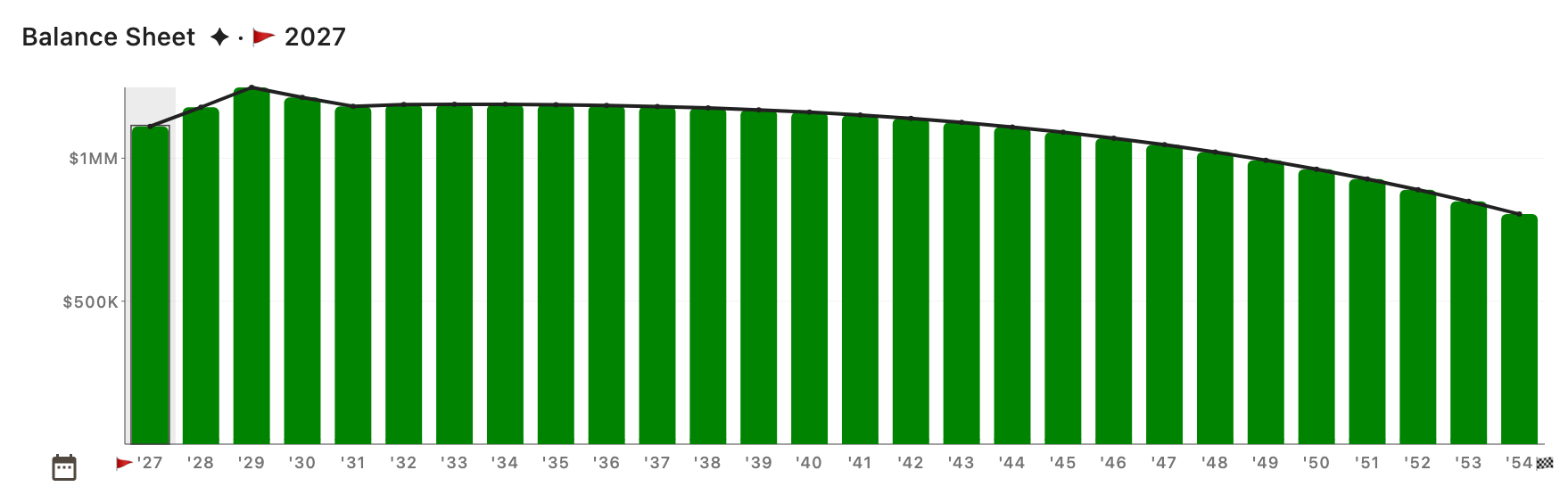 | BS ChartA Forecast Detail chip. BS = balance sheet. Assets above the line, liabilities below, over the forecast years. The net line, drawn in thick black, is net worth — often the thing you came for. Click a year to load the tables. | Whether the stock share grows over time. |
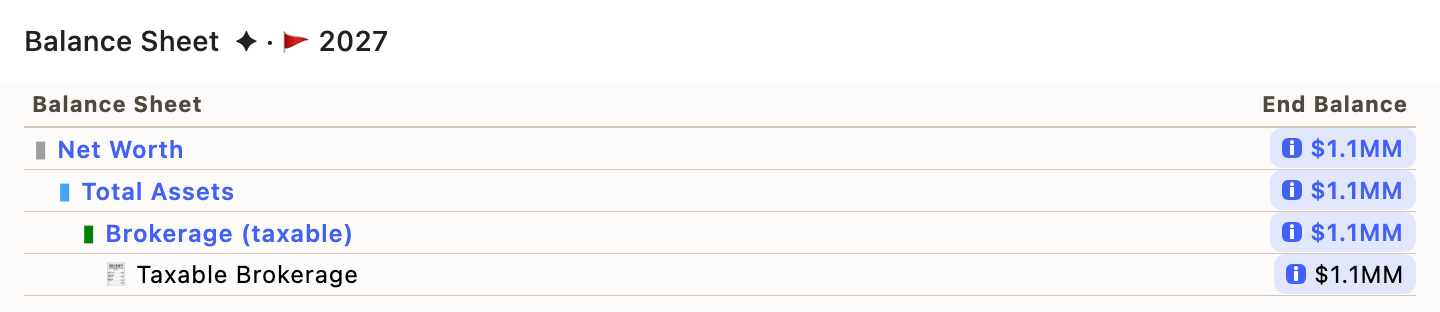 | BS TableA Forecast Detail chip. BS = balance sheet for the selected year — real assets, accounts, liabilities, net worth. Copyable companion to BS Chart. | The two funds in a selected year. |
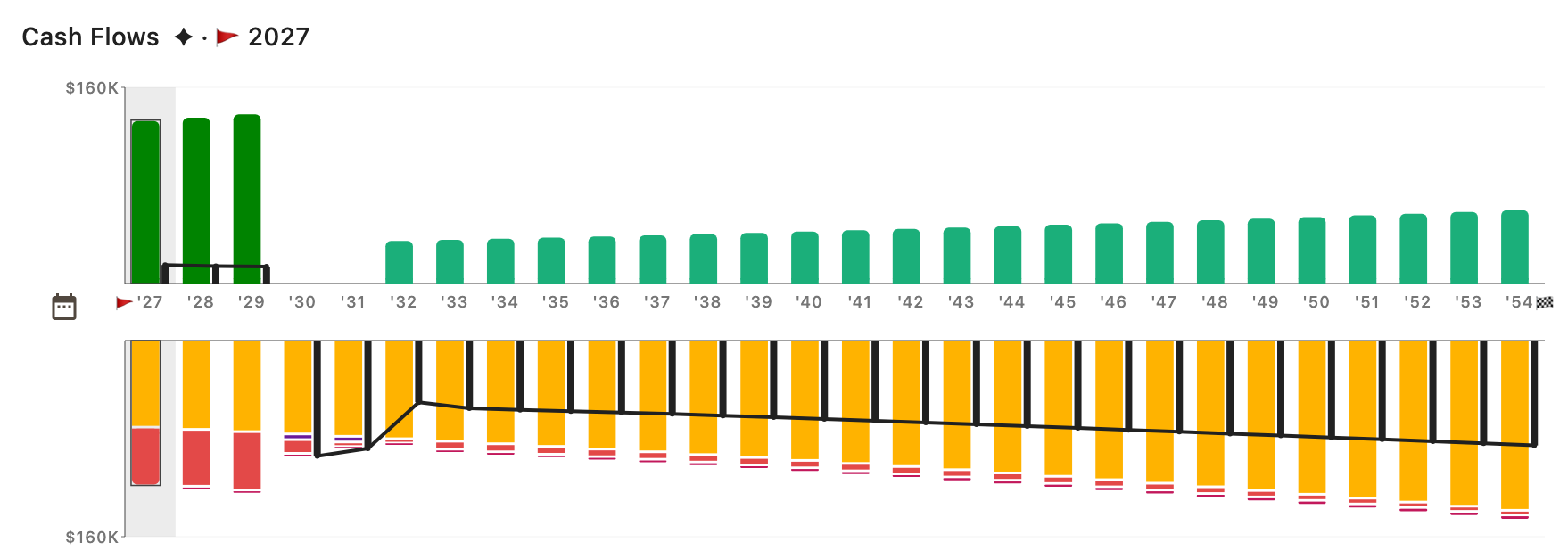 | CF ChartA Forecast Detail chip. CF = cash flows. Money in above the line, money out below, by category over the years. The net line, drawn in thick black, is net cash flow — often the thing you came for. | Income while Homer works, living expenses, and the years the plan invests or sells. |
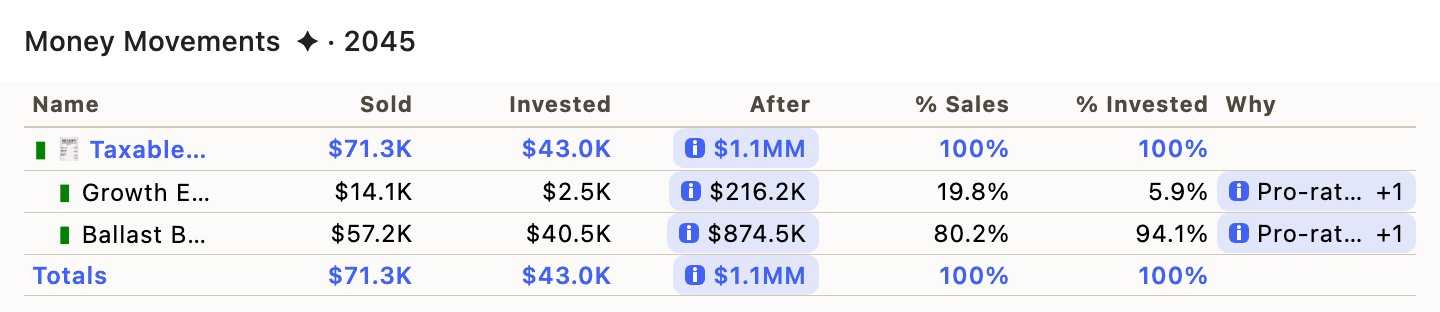 | Moves TableA Forecast Detail chip. Mov = Movements. Holding-level trades for the selected year — sold or invested, after, %, and Why. | Why each trade happened. Pro-rata trades say so, and glide trades say Glide rebalance. |
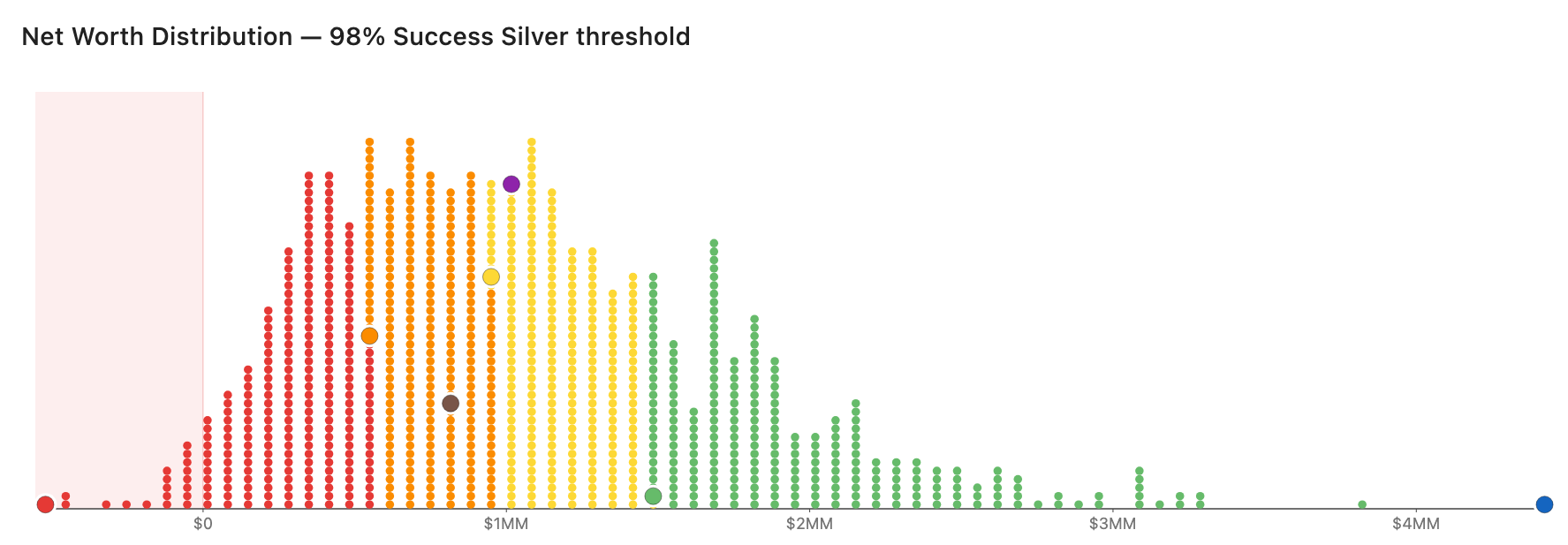 | NW Distribution | The spread of ending net worth after a strategy switch. |
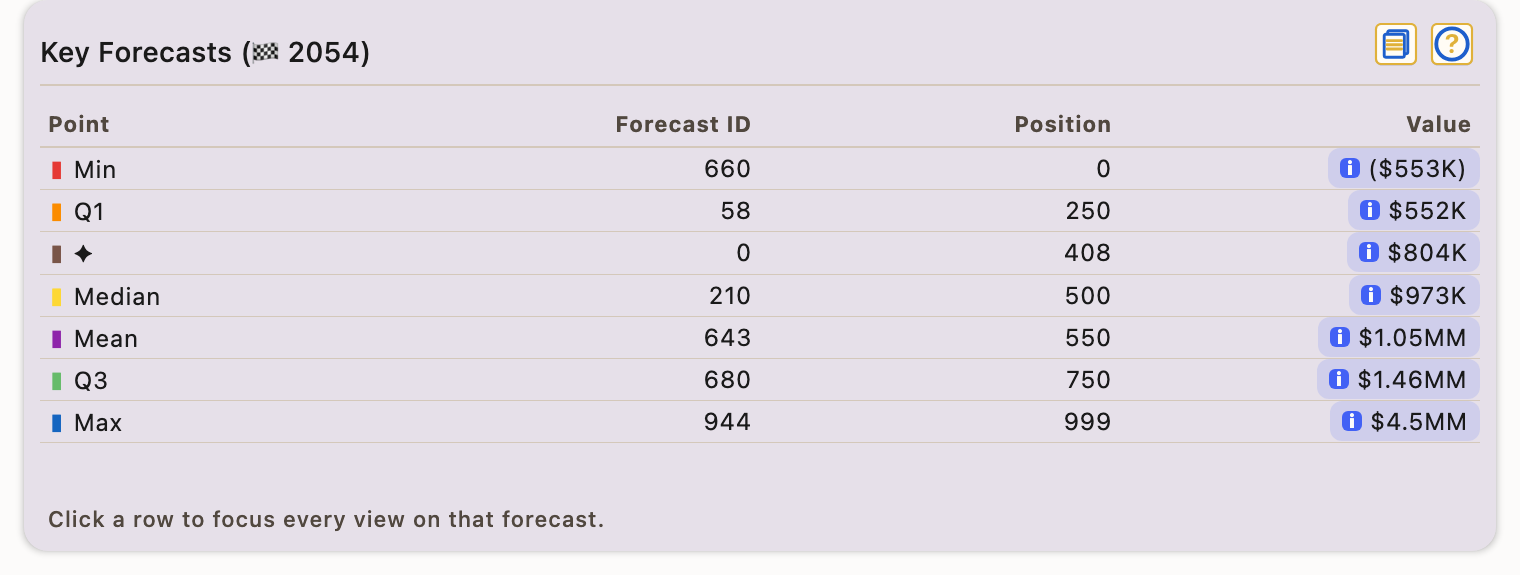 | Key Forecasts | Ending net worth on the GMF path and across paths. |
Read the FID 0 / GMFHow the north star is labeled in the FID control: FID 0 is the deterministic GMF ✦ path, and every other FID is a randomized draw from the simulation. Choose it when you want the year-by-year read to hold still while you change something else about the plan.Full entry → path first. The chart controls are explained in Close up, zoom and Reveal.
| Place | Use |
|---|---|
| The Money movement strategy in AssumptionsA main-rail area. The rules the forecast runs under — growth, taxes, movements, success definition, locality, currency. Read and write. | Changes the plan's strategy for good. |
 TransformsA main-rail area. The name is Transforms because you transform a copy of the plan — a what-if — without rewriting the original dossier. Compare original vs modified side by side. → Money movements modifiable | Tries the other strategy as a what-if, then Re-simulate. |
Switch Pro-rata to Glide rebalance and leave the accounts and the spending alone for the first experiment. The target is already in place, so the switch is the only change.
Until you switch, the plan's issue list carries a warning that the glide path is not used by the withdrawal strategy. That is the point this lesson makes: under pro-rata the target is written down but nothing reads it. The warning goes away once the strategy is glide rebalance.
- Confirm that Ballast Bond is much larger than Growth Equity at the start, in Bird's EyeWhen you are not on Dossier, this control sits in the top toolbar. Opens a household overview as a modal — people, assets and liabilities, cash flow — without leaving the area you are in. Hidden on Dossier, because that same overview already sits at the top of that area. or BS TableA Forecast Detail chip. BS = balance sheet for the selected year — real assets, accounts, liabilities, net worth. Copyable companion to BS Chart..
- Note that the strategy is Pro-rata, and note the plan's net worth in its last year on the GMF path.
- Open AssumptionsA main-rail area. The rules the forecast runs under — growth, taxes, movements, success definition, locality, currency. Read and write. and read the Glide path target grid under the Money movement strategy. Then switch the strategy to Glide rebalance and Re-simulate.
- Scrub BS ChartA Forecast Detail chip. BS = balance sheet. Assets above the line, liabilities below, over the forecast years. The net line, drawn in thick black, is net worth — often the thing you came for. Click a year to load the tables. or BS TableA Forecast Detail chip. BS = balance sheet for the selected year — real assets, accounts, liabilities, net worth. Copyable companion to BS Chart. through the years. Under pro-rata, stocks stay around a fifth of the portfolio for the whole plan. Under glide rebalance, each year's leftover cash and each year's shortfall are steered toward the target, so the stock share climbs to more than a quarter by 2035 and about two fifths by 2040. It meets the target in the late 2040s and then follows it down toward 50/50.
- Compare the endings. The plan stays solventAble to meet obligations — in a plan, that the money did not run out before the horizon. It is a lower bar than it sounds: a path can stay solvent while spending far less than intended, which is why solvency and success are not the same test.Full entry → to the end under both strategies, and under glide rebalance it ends with about 29% more net worth, because more of the money spent those years growing at stock returns.
- Edit the target and re-simulate. Try a later second column, or a 60/40 end point, and watch how much the ending moves. The point of the grid is that you can say what mix you want without touching a single fund.
Read the direction rather than the dollars. On a bond-heavy portfolio with a target that asks for more stock, steering the leftover cash toward the target helps.
| Lesson | What the strategy changes |
|---|---|
| Tax-account order vs pro-rata | Which tax bucket pays first (taxable cash and a fast-growing Roth). |
| This page | The mix of investments, through a glide path (a bond-heavy account and a stock-leaning target). |
| Glide paths through retirement | A glide path that changes with the years: the bond tent, rebalancing inside the IRA, and a crash at retirement. |
The three strategies answer different questions, and each sample is tuned so that one switch is easy to read.
| Topic | Lesson |
|---|---|
| A path that changes over retirement | Glide paths through retirement |
| Tax-account order | Tax-account order vs pro-rata |
| The full dual-earner household | Meet the Springfield household |
| Claiming age and longevity | Claim early vs live long |
| A forced traditional RMD | Forced traditional RMD vs residual tax order |
| A map of the app | Getting around the app |
The quantities are illustrative. What the lesson teaches is that on a bond-heavy portfolio with a target that asks for more stock, glide rebalance moves the mix toward the target and leaves the plan better off than pro-rata. The direction is the lesson, and the dollars are only an illustration.
Rebuild this plan by hand
The cards on the canvas show the accounts and cash flows. These are the settings that live outside any card, read from the plan itself, with the label each control carries in the app. A value marked default is one to leave alone.
| Setting | Springfield Glide |
|---|---|
| Household | |
| Planning region | United States (default) |
| Homer (Primary) | |
| birth year | 1965 |
| retirement age | 65 |
| death age | 90 |
| Taxes | |
| Tax regime | United States |
| Filing status | Single |
| State of residence | Ohio |
| First-year federal estimate | — |
| First-year state estimate | — |
| Strategy | |
| Residual withdrawal strategy | Pro-rata (default) |
| Roth conversions | Off |
| Definition of success | Liquidity crises allowed (default) |
| Glide path target | Set (2 target allocations) |
| Target for 2030 | Domestic stocks 75% · Bonds 25% |
| Target for 2055 | Domestic stocks 50% · Bonds 50% |
| Advanced | |
| Reporting inflation | Assumption set's rate (default) |
| Cost of capital | Assumption set's rate (default) |
| Growth assumptions | Growth overrides (default) |
| Currencies | Multiple currencies (default) |
| Default currency | USD (default) |
| Display currency | USD (default) |

Educational content — not advice. These lessons teach how Tutilis models a plan and how to read what it shows. The households, balances, and outcomes in them are invented for teaching. Nothing here is financial, investment, tax, or legal advice, or a recommendation to buy, sell, or hold anything. A model cannot know your circumstances — check anything you take from a lesson against your own situation, and against a qualified professional where it matters.