
 Quick Jump: find anything by its name
How this page works
New to the Learning Center, or want a map of the panels? Start with a tour: Reading Lesson (Getting Around) or Screencast Lesson (Getting Around) — both walk through Tutilis next to a live planThe running Tutilis product next to this lesson — navigation, Bird's Eye, Forecaster, tools, and more — loaded with a teaching sample. A dossier is the plan data; the live plan is the full product surface with a sample dossier already open so you can explore. On the web, teaching samples are not editable the way your own dossier will be in the full app.Full entry → (to the right on a desktop-width screen, or below when stacked on a tablet).
This page — Quick Jump: find anything by its name — includes a live sample planThe running Tutilis product next to this lesson — navigation, Bird's Eye, Forecaster, tools, and more — loaded with a teaching sample. A dossier is the plan data; the live plan is the full product surface with a sample dossier already open so you can explore. On the web, teaching samples are not editable the way your own dossier will be in the full app.Full entry → next to the text. On a wide screen it usually sits to the right of the text; on a tablet it usually sits below. Use the text for the walk-through, then try the same ideas in the live plan.
The live planThe running Tutilis product next to this lesson — navigation, Bird's Eye, Forecaster, tools, and more — loaded with a teaching sample. A dossier is the plan data; the live plan is the full product surface with a sample dossier already open so you can explore. On the web, teaching samples are not editable the way your own dossier will be in the full app.Full entry → next to this page — usually to the right on a wide screen, or below on a tablet — is Tutilis running a teaching sample: the same financial planning product available as a desktop application (early preview). A dossierYour full plan in Tutilis: the people in the household, what they own and owe, cash flows in and out, tax setting, and planning assumptions. One dossier is one complete situation as the product models it.Full entry → is the plan data; the live plan is the full product (navigation, Bird's Eye, Forecaster, tools) with a sample dossier already open so you can try the panels. See planned pricing. On the web, Learning Center samples are not editable the way your own dossier will be in the full app. Your own household goes in the Tutilis desktop app — the Learning Center front page has a short clip of that.
The Learning Center is meant to be useful to everyone who visits it, whether or not Tutilis ever becomes part of how you plan. The Glossary and the Reference are a large part of that. Both are free to read on this site, and both are inside the app as well, a keystroke away from whatever you are doing. Another keystroke opens Quick Jump, which lets you find any setting or result by name.
Every planner eventually knows the name of what they want without knowing where it lives. You may know you want the ten-year ruleThe SECURE Act rule for most people who inherit a retirement account after 2019: the account must be empty by December 31 of the tenth year after the owner's death. When the owner had already started RMDs, the heir must also take a distribution every year along the way. An estate gets a 5-year version when the owner had not started RMDs.Full entry →, a Roth conversionDeliberately moving money from a traditional account into a Roth one and paying the income tax on it now, so it grows and comes out tax-free later. The usual reason is a low-income year — between retiring and claiming benefits, say — where the conversion is taxed at a lower rate than the future withdrawal would be. It also shrinks later RMDs.Full entry → or IRMAAIncome-Related Monthly Adjustment Amount — a surcharge on Medicare premiums for higher-income households. It works in tiers, so one dollar of extra income can raise the premium for a whole year. It looks back at a tax return from a couple of years earlier, which is why a one-off spike (a big conversion, a property sale) shows up as a bill much later.Full entry →, but a plan has hundreds of inputs, what-if controls and forecast views, and the one that answers your question can be several clicks deep. This lesson shows how Quick Jump takes you there by name, and how the Glossary and the Reference explain the word and the figures behind it once you arrive.
The canvasWhat we call the right side of this page (or the bottom on a narrow screen) where the Tutilis application is drawn in this web Learning Center setting. It is the same product surface as the live plan — navigation, Bird's Eye, Forecaster, and so on — not a separate product.Full entry → holds Jordan, the heir from Inheriting an IRA: the 10-year rule, who is drawing an inherited traditional IRAA traditional IRA held by someone who inherited it. It keeps its tax character, so every withdrawal is ordinary income, but the owner's lifetime RMD rules stop at the death and the beneficiary rules take over: for most adult children, the account must be empty by the end of the tenth year after the death. No one may contribute to it, and withdrawals carry no 10% early-withdrawal tax at any age.Full entry → at the minimum required. It is a good plan for practicing, because the two questions people most often ask about it are both questions of where to look.
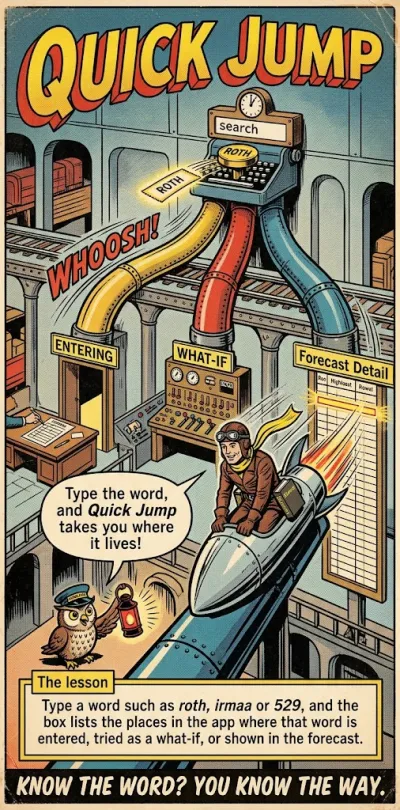
Quick Jump is the search box at the top of the window, and it finds places rather than documents. Press Ctrl-. from anywhere, including while you are typing in a field, and the caret moves into the box. Type a word such as roth, irmaa or 529, and the box lists the places in the app where that word is entered, tried as a what-if, or shown in the forecast.
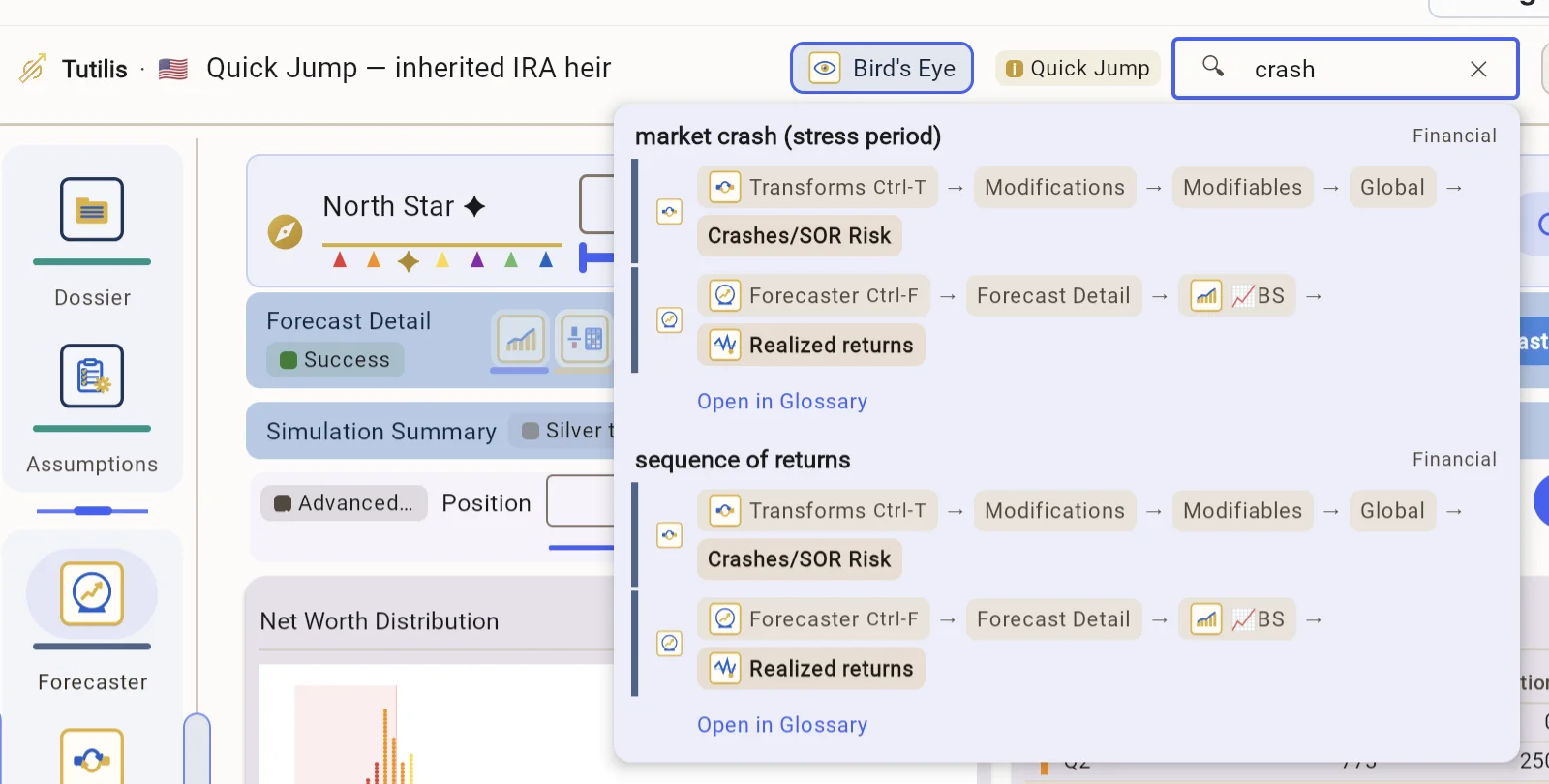
The picture shows the list for crash. Two words match, and each lists a what-if row in Transforms and the Realized returns view of the Balance Sheet chart, so a market crash can be tried on the plan and then seen in the forecast.
The list keeps those three kinds of place in that order under each word. A place where you enter a value comes first, then a row in  TransformsA main-rail area. The name is Transforms because you transform a copy of the plan — a what-if — without rewriting the original dossier. Compare original vs modified side by side. where you can try it as a what-if without changing the plan, and then the tables and charts where it shows up in the forecast. Use the arrow keys to pick a place and Enter to go there, or click it. The last row under every word opens that word in the Glossary, because a word you want to find is often a word you also want explained.
Quick Jump remembers the word after you jump. A word often lives in several places, so the next one is Ctrl-. and the down arrow away, with no retyping. Press Esc to close the list, and Esc again to clear the box.
The ten-year rule says that most heirs must empty an inherited IRAIndividual Retirement Account — a retirement wrapper you open yourself rather than through an employer. It comes in traditional (pre-tax going in) and Roth (taxed going in) flavors, so naming the flavor matters more than the acronym does.Full entry → by the end of the tenth year after the owner's death. The question that follows is where the forecast shows that it actually happens. Type ten-year into Quick Jump and the app answers it with three places. The card below shows the two that the canvas beside this lesson can open.
The first place, which only the desktop app opens, is the account itself in the Dossier, where the owner's year of death sets the deadline. The second is the Why column of the  Moves TableA Forecast Detail chip. Mov = Movements. Holding-level trades for the selected year — sold or invested, after, %, and Why., where each required withdrawal is marked as an RMDRequired Minimum Distribution — once you reach an age set by statute, the law makes you withdraw a minimum amount each year from traditional retirement accounts, whether or not you need the money. The withdrawal is taxable income, so RMDs can push a household into a higher bracket or over a surcharge threshold. Roth accounts are generally not subject to them.Full entry →. Click the scale icon on one of those rows and a small card shows the rule that applies, the deadline year, the prior balance and the amount the year requires. The third place is the
 BS ChartA Forecast Detail chip. BS = balance sheet. Assets above the line, liabilities below, over the forecast years. The net line, drawn in thick black, is net worth — often the thing you came for. Click a year to load the tables., which is where the answer to the question is easiest to see. Jordan's inherited IRA is still large at the end of 2034, falls to zero at the end of 2035, the deadline year, and stays at zero after that.
A Roth conversion moves money from a traditional account into a RothA retirement account where you pay income tax on the money going in, and qualified withdrawals later come out tax-free — the mirror image of traditional. Named after the senator behind the law, so the word tells you nothing on its own. Plans care because Roth dollars do not add to taxable income later, which keeps them clear of income-driven cliffs.Full entry → account and pays the tax now. It is a plan assumption rather than an account, so its setting and its results live in different parts of the app. Type roth into Quick Jump and the word Roth conversion lists them together.
You turn conversions on under Roth conversion in  AssumptionsA main-rail area. The rules the forecast runs under — growth, taxes, movements, success definition, locality, currency. Read and write., on the short page as well as the full panel. Once a policy is on, each year's conversion appears in the Moves TableA Forecast Detail chip. Mov = Movements. Holding-level trades for the selected year — sold or invested, after, %, and Why. with Roth conversion in its Why column. The
 BracketsA Forecast Detail tax-lens chip. Ordinary-income tax ladder for the selected year — how full the brackets are and who filled them. card shows the policy and how far each year's conversion fills the bracketA band of income taxed at a given rate. The common misreading is that entering a higher bracket taxes all your income at that rate — it does not. Only the dollars inside that band pay the higher rate, so a raise never leaves you with less after tax.Full entry → you chose. The
 CliffsA Forecast Detail tax-lens chip. MAGI / IRMAA / NIIT-style cliff radar — threshold lanes by year. card flags the conversion years on its path, and its IRMAA lane shows when a conversion's income lands in the two-year lookback that sets a surchargeAn extra amount added on top of a normal charge once income passes a line — in planning, almost always the Medicare premium surcharge. It is not a tax rate, so it does not show up in a bracket; it arrives as a higher premium, in tiers, based on a tax return from two years earlier.Full entry → on the Medicare premiumWhat you pay for coverage — a monthly insurance or Medicare cost — and not a bonus or a prize. Confusingly, the same word means "above face value" when applied to a bond. In a plan it is nearly always the insurance sense: a recurring outflow that rises with age and, past a threshold, with income.Full entry →. The federal and state statements in the
 TaxesA Forecast Detail tax-lens chip. Tax statement for the selected year (federal, state when modeled, property). card show the tax itself.
Jordan's plan has conversions turned off, so the Brackets card shows the policy as off and the conversion rows are empty. The places are the same on your own plan, and that is the point of jumping by name. You do not need to remember that the IRMAA effect lives on a card called Cliffs, because the word takes you there.
The Glossary explains what the words in a plan mean, from AGIAdjusted Gross Income — total income minus a specific set of adjustments, and the number many other tax rules build on. It is a midpoint, not your taxable income: deductions still come off after it.Full entry → to the ten-year rule. Press Ctrl-G to open it. The key works while you are typing in a field, because the moment you most want a definition is when the caret sits in the field that used the word, and closing the field to look it up would lose your place.
Each Glossary entry ends with a block called Where it is in the app. It lists the same places Quick Jump lists, drawn the same way, and each one is a click that takes you there. Quick Jump is that block moved to the top of the window, where people look first. The Glossary is where you go when you want the meaning as well as the place.
The Glossary is also on this site at /glossary, free for anyone to read, whether or not they use the app.
The Reference lists every table, rate and rule the forecast runs on, such as the tax brackets, the contribution limits, the IRMAA tiers and the life-expectancy tables behind required distributions. Each one names its source and its limits. Press Ctrl-R to open it, and like the Glossary it opens while you are typing.
The Reference and the Glossary look alike on purpose, because they are the same kind of thing. The Glossary holds the vocabulary and the Reference holds the numbers. The Reference is read-only, since it records what the world publishes rather than a choice in your plan. When a forecast surprises you, the Reference is where you check which figure it used.
The Reference is on this site too, at /reference, with the same free access as the Glossary.
The canvas beside this lesson is the app itself, so Quick Jump, the Glossary and the Reference all work in it. On a Mac the keys are the same Ctrl keys as in the app. On Windows and Linux the browser already uses the Ctrl-letter keys for its own commands, so the Learning Center takes the same letters with Alt instead, such as Alt-G for the Glossary.
The Jump to cards in other lessons are Quick Jump inside the page. Each card lists a word's places, and a click takes the canvas there, exactly as a row in the Quick Jump list would. For the rest of the app's keys and the reasons behind them, see Working fast: the shortcuts and why they exist.
Rebuild this plan by hand
The cards on the canvas show the accounts and cash flows. These are the settings that live outside any card, read from the plan itself, with the label each control carries in the app. A value marked default is one to leave alone.
| Setting | Inherited IRA heir |
|---|---|
| Household | |
| Planning region | United States (default) |
| Jordan (Primary) | |
| birth year | 1976 |
| retirement age | 65 |
| death age | 92 |
| Taxes | |
| Tax regime | United States |
| Filing status | Single |
| State of residence | Texas |
| First-year federal estimate | — |
| First-year state estimate | — |
| Strategy | |
| Residual withdrawal strategy | Pro-rata (default) |
| Roth conversions | Off |
| Definition of success | Liquidity crises allowed (default) |
| Glide path target | None (default) |
| Advanced | |
| Reporting inflation | Assumption set's rate (default) |
| Cost of capital | Assumption set's rate (default) |
| Growth assumptions | Growth overrides (default) |
| Currencies | Multiple currencies (default) |
| Default currency | USD (default) |
| Display currency | USD (default) |

Educational content — not advice. These lessons teach how Tutilis models a plan and how to read what it shows. The households, balances, and outcomes in them are invented for teaching. Nothing here is financial, investment, tax, or legal advice, or a recommendation to buy, sell, or hold anything. A model cannot know your circumstances — check anything you take from a lesson against your own situation, and against a qualified professional where it matters.