
 Saving for college with a 529
The situation Parents of two with college coming — how much does a 529 need, who should own it, and what happens to money left over?

How to use this case study
New to the Learning Center, or want a map of the panels? Start with a tour: Reading Lesson (Getting Around) or Screencast Lesson (Getting Around) — both walk through Tutilis next to a live planThe running Tutilis product next to this lesson — navigation, Bird's Eye, Forecaster, tools, and more — loaded with a teaching sample. A dossier is the plan data; the live plan is the full product surface with a sample dossier already open so you can explore. On the web, teaching samples are not editable the way your own dossier will be in the full app.Full entry → (to the right on a desktop-width screen, or below when stacked on a tablet).
This page — Saving for college with a 529 — includes a live sample planThe running Tutilis product next to this lesson — navigation, Bird's Eye, Forecaster, tools, and more — loaded with a teaching sample. A dossier is the plan data; the live plan is the full product surface with a sample dossier already open so you can explore. On the web, teaching samples are not editable the way your own dossier will be in the full app.Full entry → next to the text. On a wide screen it usually sits to the right of the text; on a tablet it usually sits below. Use the text for the walk-through, then try the same ideas in the live plan.
The live planThe running Tutilis product next to this lesson — navigation, Bird's Eye, Forecaster, tools, and more — loaded with a teaching sample. A dossier is the plan data; the live plan is the full product surface with a sample dossier already open so you can explore. On the web, teaching samples are not editable the way your own dossier will be in the full app.Full entry → next to this page — usually to the right on a wide screen, or below on a tablet — is Tutilis running a teaching sample: the same financial planning product available as a desktop application (early preview). A dossierYour full plan in Tutilis: the people in the household, what they own and owe, cash flows in and out, tax setting, and planning assumptions. One dossier is one complete situation as the product models it.Full entry → is the plan data; the live plan is the full product (navigation, Bird's Eye, Forecaster, tools) with a sample dossier already open so you can try the panels. See planned pricing. On the web, Learning Center samples are not editable the way your own dossier will be in the full app. Your own household goes in the Tutilis desktop app — the Learning Center front page has a short clip of that.
College is often a household’s largest multi-year outflow after housing. This lesson starts with what a 529 college savings plan is, then looks at what college roughly costs, how saving into a 529 shows up in a plan, and a few ownership and leftover-money points that change planning more than people expect.
The live plan on the right is Springfield College 529. Homer and Marge have two children, Bart and Lisa, as dependents. Each child has a parent-owned 529, a college expense cash-flow template linked to that account, and $500 a month going in until that child starts school.
A 529 plan is a tax-advantaged account for education savings (and some related education uses under current law). In broad terms:
| Idea | Plain meaning |
|---|---|
| Contributions | After-tax money you put in (no federal income tax deduction; some states offer a state break — state-specific). Modeled here — see Putting money in below |
| Growth | Earnings can grow federal income tax deferred while in the plan |
| Qualified withdrawals | For qualified education expenses, earnings can come out federal income tax free (and often state-tax free) |
| Non-qualified withdrawals | Earnings may be taxed and can face an additional tax — rules and exceptions exist; check current IRS guidance |
| Investments | You choose among the plan’s menu (often age-based or static fund options) — not every broker’s full lineup |
This product models a 529 account type with a beneficiary (the child it is for) and can link college spending to a 529, so the forecast draws that account first in the linked college years. It does not simulate every state tax deductionAn amount subtracted from income before the tax is computed, so it saves tax at your marginal rate rather than dollar for dollar. That is the difference from a credit, which comes off the tax itself: a $1,000 deduction is worth a few hundred dollars, a $1,000 credit is worth $1,000.Full entry →, plan fee schedule, or financial-aid formula.
Where to look: open  DossierA main-rail area. Where the household plan is defined — people, assets and liabilities, cash flows. In these lessons you mainly view; on desktop you enter and edit your own plan. → Assets. You will find Bart College 529 and Lisa
College 529, both of type College 529. Each holds one U.S. stock fund (Bart 529 Equity and
Lisa 529 Equity), and each balance is a partial pre-fund. It is enough to get started and
not enough to pay four years of college on its own.
The monthly saving that tops each account up is authored on the account itself, in a section called
Contributions. Only the desktop app shows that section (Assets → Bart College 529 →
Contributions). On the live plan beside this lesson, the same saving appears as a College
saving row under Transfers on  Bird's EyeWhen you are not on Dossier, this control sits in the top toolbar. Opens a household overview as a modal — people, assets and liabilities, cash flow — without leaving the area you are in. Hidden on Dossier, because that same overview already sits at the top of that area.. The section Putting money in below walks
through it.
The table below gives order-of-magnitude figures. These are rough sizes, rounded to show whether a year of school costs closer to $5,000, $30,000 or $90,000, rather than precise prices. They are the same figures the app shows in its College expense help, so the lesson and the editor do not quote different numbers at you.
Published “sticker” prices are only a starting point. Many students pay less after grants, and living costs matter as much as tuition. In the product, a college template takes a full annual budget (tuition + housing/food or a commuter equivalent), a start year (often near age 18 for the linked student), years of attendance, and a cost-growth assumption that compounds the series. Net price after aid can land well below sticker for the same school. The table shows rough sizes and says nothing about any one household’s aid package.
| Path | Tuition & fees (rough) | All-in per year (rough) |
|---|---|---|
| Community college | ~$4k | ~$15–22k |
| State college (in-state) | ~$12k | ~$28–35k |
| Private (avg) | ~$45k | ~$60–65k |
| Elite / highly selective | ~$65–75k+ | ~$85–95k+ |
Figures are U.S. ballparks for about 2025–26. They are not forecasts of what Bart or Lisa will pay.
On this sample: each college template uses about $32k/year in plan-year dollars — inside the state all-in band — for four academic years. Bart starts around 2032, Lisa around 2034. Amounts grow with the template’s cost-growth assumption.
Where college shows up on Bird's EyeWhen you are not on Dossier, this control sits in the top toolbar. Opens a household overview as a modal — people, assets and liabilities, cash flow — without leaving the area you are in. Hidden on Dossier, because that same overview already sits at the top of that area.
Bird's EyeWhen you are not on Dossier, this control sits in the top toolbar. Opens a household overview as a modal — people, assets and liabilities, cash flow — without leaving the area you are in. Hidden on Dossier, because that same overview already sits at the top of that area.People & events — open DossierA main-rail area. Where the household plan is defined — people, assets and liabilities, cash flows. In these lessons you mainly view; on desktop you enter and edit your own plan. → Bird's EyeWhen you are not on Dossier, this control sits in the top toolbar. Opens a household overview as a modal — people, assets and liabilities, cash flow — without leaving the area you are in. Hidden on Dossier, because that same overview already sits at the top of that area. → People & events. Homer and Marge keep the
work/retire/death pattern; Bart and Lisa each get a short college range on the life-events
timeline (purple bars in the mid-2030s).
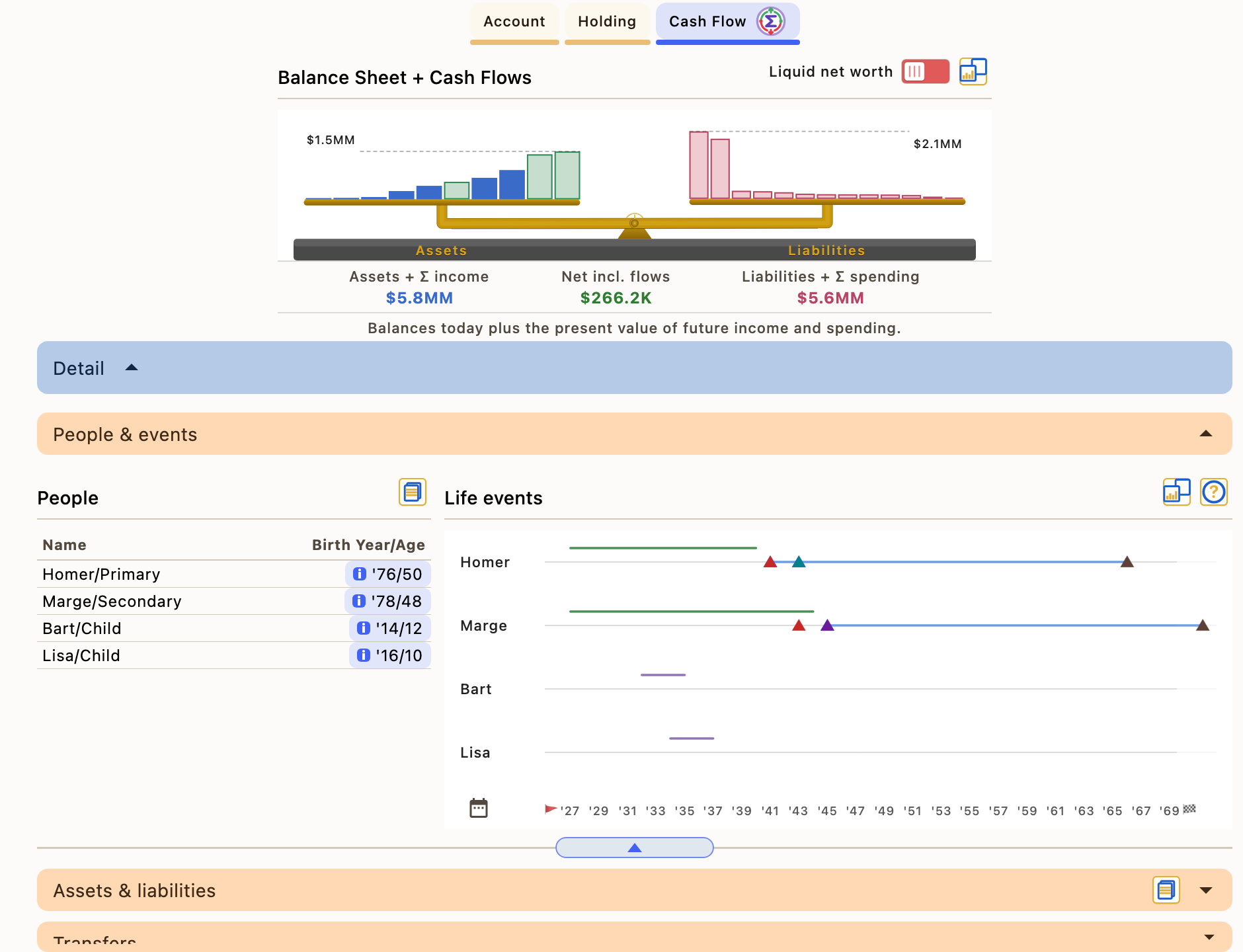
Bird's EyeWhen you are not on Dossier, this control sits in the top toolbar. Opens a household overview as a modal — people, assets and liabilities, cash flow — without leaving the area you are in. Hidden on Dossier, because that same overview already sits at the top of that area. → People & events. People list on the left (Homer, Marge, Bart, Lisa). Life events
on the right: green work, blue retirement, markers for claim/death — and short college spans
on Bart’s and Lisa’s rows.
Assets & liabilities with Cash Flow: open DossierA main-rail area. Where the household plan is defined — people, assets and liabilities, cash flows. In these lessons you mainly view; on desktop you enter and edit your own plan. → Bird's EyeWhen you are not on Dossier, this control sits in the top toolbar. Opens a household overview as a modal — people, assets and liabilities, cash flow — without leaving the area you are in. Hidden on Dossier, because that same overview already sits at the top of that area. → Assets &
liabilities, and switch the mode at the top from Account to  A Bird's Eye / Assets & Liabilities mode. Weaves recurring cash flows into the sheet — inflows with assets, outflows with liabilities. The Σ badge (when on) rolls a series into a present-value-style total. Not a CPA balance sheet on purpose.. In that mode the
liability side lists spending streams as well as debts. Bart college and Lisa college each
get a row of their own there, next to the separate lifestyle, mortgage and health-plan rows. College
is not folded into any of those other rows.
HoverOn a desktop or laptop, rest the pointer on a row, chip, or control to open a detail card — attributes, amounts, and often a small path chart. We put a lot of teaching detail in those cards on purpose. Hover needs a pointer, so it does not work on tablets or phones (tap may show a simpler view or nothing). Hold Alt if the tips become a nuisance — many product hovers stay closed while Alt is down so you can move the pointer freely.Full entry → Bart college (or Lisa) for its detail card. The card first shows what the college cost was built from: the student, the annual cost in today's dollars, the number of years, the start year and how fast the cost grows. Below that, Flow value gives the first and last year of the expense the forecast pays. Funded by names the linked 529 account, and a sparkline at the bottom draws the four years of cost.
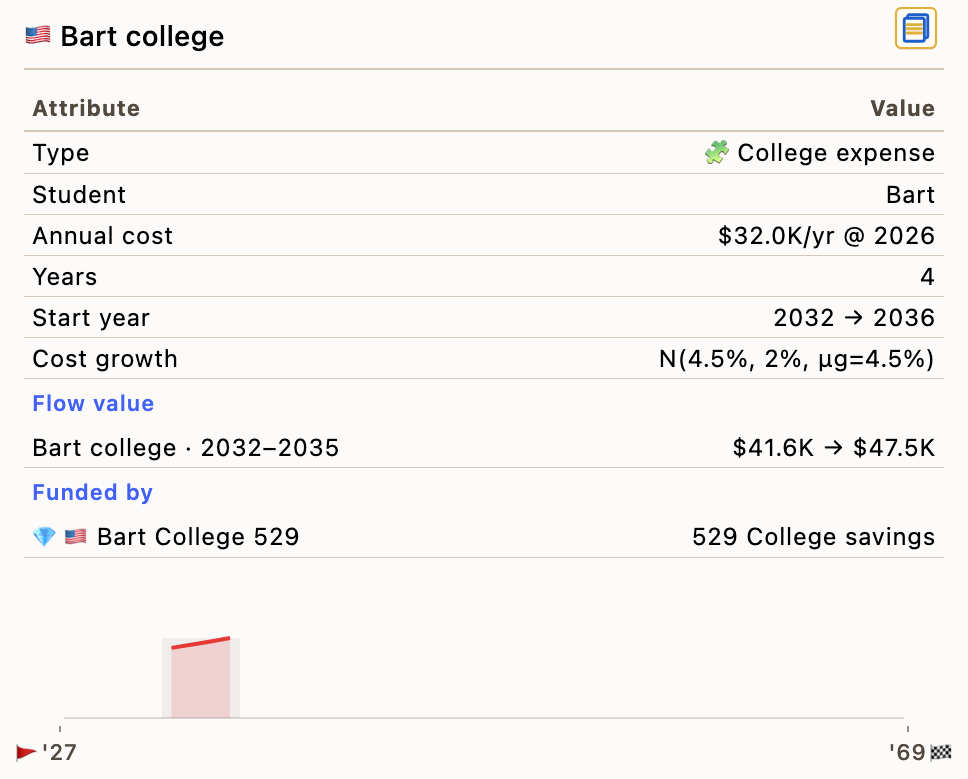
Bird's EyeWhen you are not on Dossier, this control sits in the top toolbar. Opens a household overview as a modal — people, assets and liabilities, cash flow — without leaving the area you are in. Hidden on Dossier, because that same overview already sits at the top of that area. → Assets & liabilities (Cash Flow on). Assets include Bart College 529 and
Lisa College 529. Liabilities list Bart college / Lisa college. The card for Bart college shows the inputs behind the expense, its four years of cost and Funded by → that child’s 529 account, whatever it holds.
Hover the matching 529 on the Assets side for a different tip: holdings, cost basisWhat you paid for an investment — the starting point tax measures your gain against. Sell for more than basis and the difference is a taxable gain; the money you originally put in is not taxed again. It is the reason two accounts with identical balances can cost very different amounts to spend from.Full entry →, expected growth, and a simple sparkline of fund growth over the plan horizon (not the college expense series).
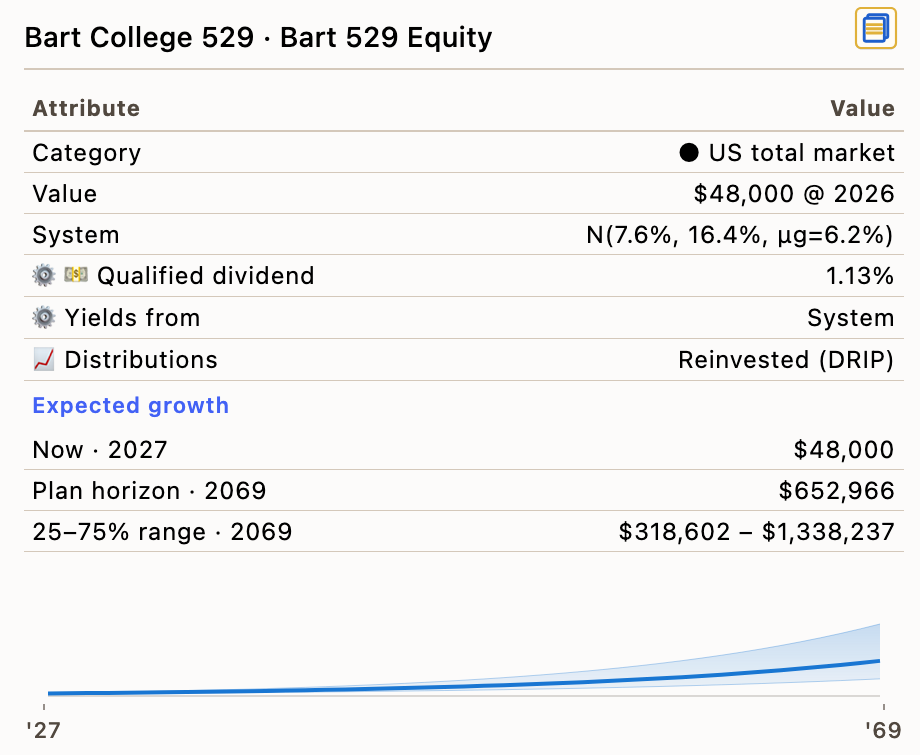
Hover Bart College 529 on Assets. Instrument table, expected growth, and a path sparkline for the 529 balance — the funding account, not the college outflow.
Present value of the outflow (same rows, two rollups)
Path: DossierA main-rail area. Where the household plan is defined — people, assets and liabilities, cash flows. In these lessons you mainly view; on desktop you enter and edit your own plan. → Bird's EyeWhen you are not on Dossier, this control sits in the top toolbar. Opens a household overview as a modal — people, assets and liabilities, cash flow — without leaving the area you are in. Hidden on Dossier, because that same overview already sits at the top of that area. → Assets & liabilities (Cash Flow on), same view as above.
Here is the full two-column board: assets (including both College 529s) on the left, liabilities (including Bart college / Lisa college) on the right, with present-value figures.
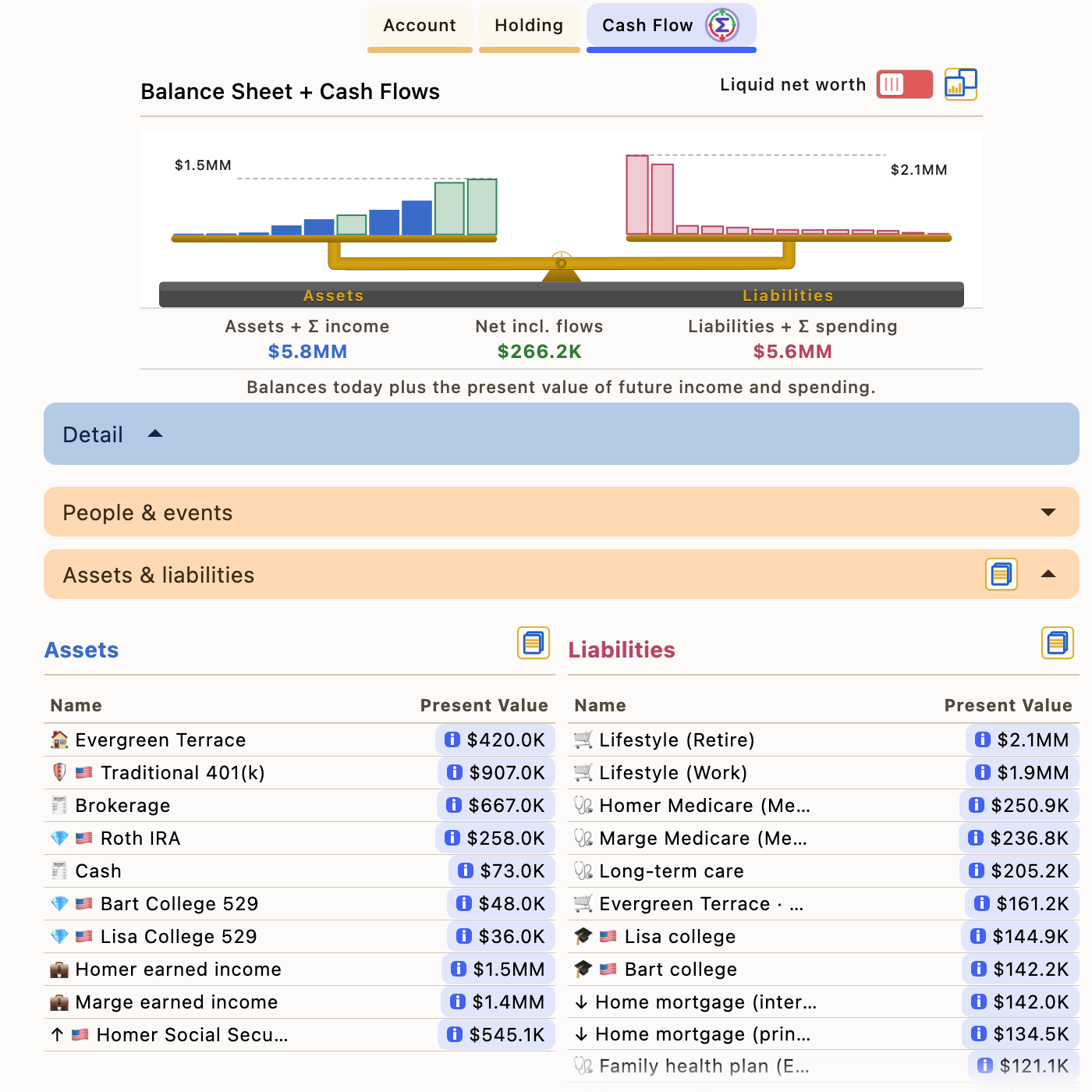
Dossier → Bird's EyeWhen you are not on Dossier, this control sits in the top toolbar. Opens a household overview as a modal — people, assets and liabilities, cash flow — without leaving the area you are in. Hidden on Dossier, because that same overview already sits at the top of that area. → Assets & liabilities, with the Σ rollup on. The small
two-pages icon at the top right of each column is its copy control: the Liabilities one copies
a markdown table of the liability list — the same shape as the first-year table below — and
Assets has its own.
Bird's EyeWhen you are not on Dossier, this control sits in the top toolbar. Opens a household overview as a modal — people, assets and liabilities, cash flow — without leaving the area you are in. Hidden on Dossier, because that same overview already sits at the top of that area. can show each named cash flow at its authored annual amount or as a sum
across years — the Σ chip on the Cash Flow selector. College is a short multi-year series, so
the two rollups answer different questions. Use the copy control when you want the list as
pasteable markdown (for notes or an AI chat).
Σ off (each flow at the annual amount it was authored with):
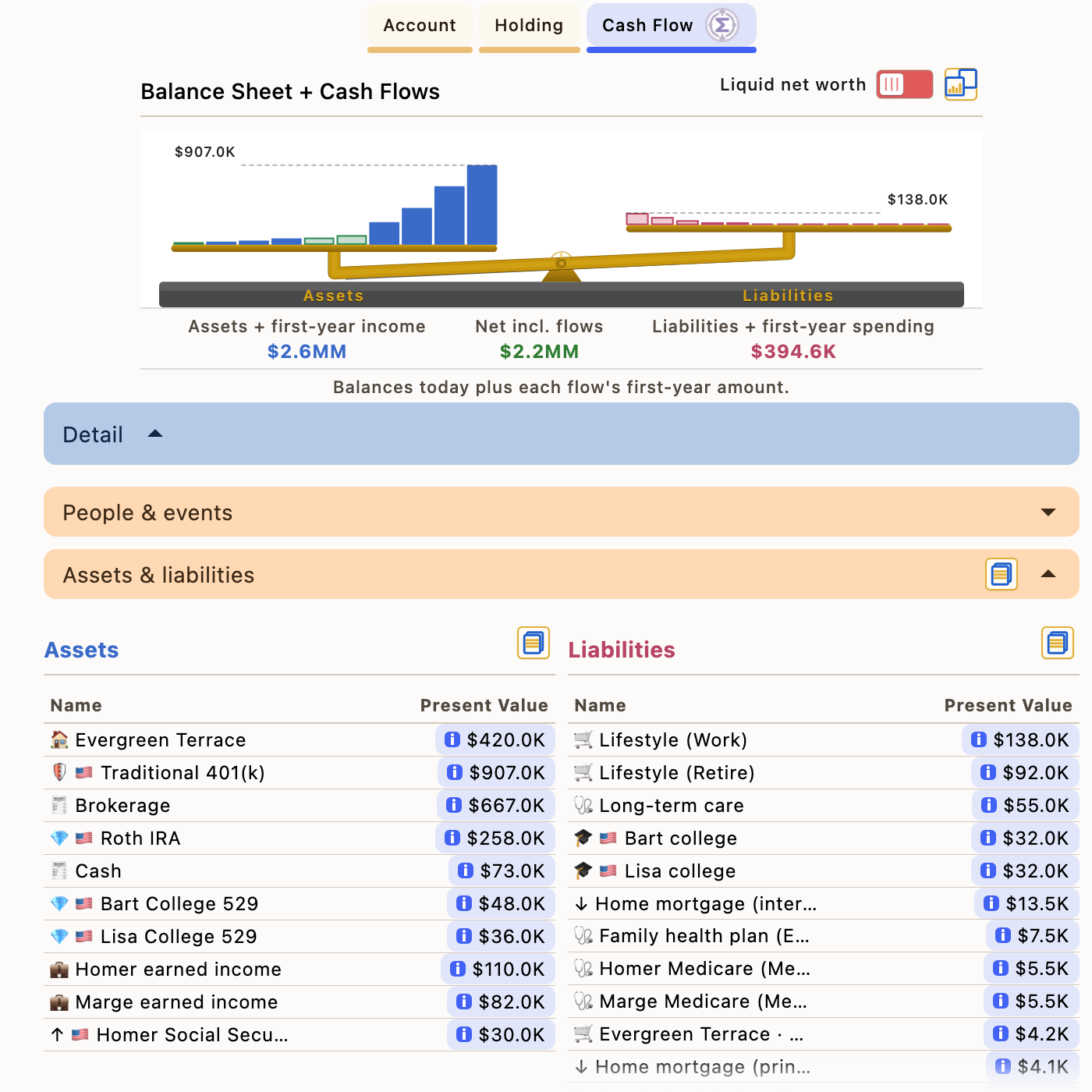
Σ off. The Balance Sheet bars and the Assets / Liabilities lists show one year's scale — Bart college and Lisa college read $32k each, the number the template was written with. Lifestyle (Work) leads the liability list; net worth stays solidly positive.
Σ on (the whole stream, summed):
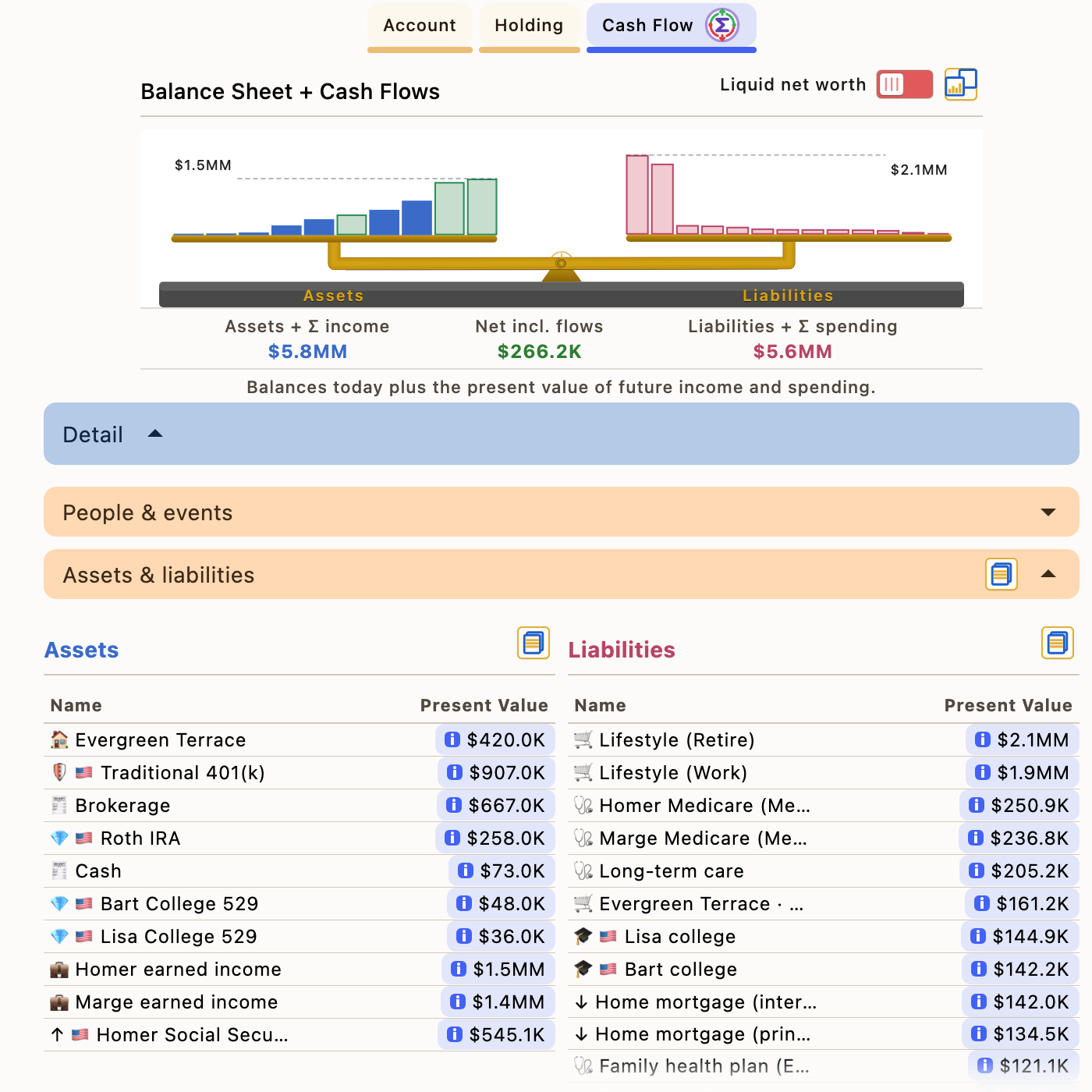
Σ on. Same rows, multi-year rollup — each college line about $140k, the four years grown at the college-cost rate and restated into plan-start purchasing powerAdjusted for inflation — a purchasing-power figure rather than a face-value one. The counterpart to nominal, and the more honest of the two over a long plan: a balance that triples in nominal dollars across thirty years may buy only a little more than it does now. Always check which one a chart is drawn in before comparing a future number to today's prices.Full entry →. Lifestyle (Retire) and the long medical and mortgage series dominate the liability side, and net worth reads far lower in this PVWhat a future amount is worth today, after discounting for the years between. A multi-year outflow shown as one present value is not a sum of its rows — a dollar due in twenty years counts for less than one due next year. The product's PV rollups and "amount mode" switches are this idea applied to a whole flow.Full entry → mode even though the Σ-off board looks comfortable.
With Σ off, each college line is the $32k the template was authored with — a cost in today's dollars, not yet grown to any particular year. The grown bill lives on the cash-flow table: scrub to 2032 and Bart's line is already above $32k, and Lisa's in 2034 is higher still — you enter a cost in today's dollars and the forecast grows it to the year the tuition is actually due, so Lisa's later start costs more for the same authored number. With Σ on, each line is about $140k. That is the four years, each grown to the year it is paid, added up and restated in plan-start purchasing power. Treat it as a rough size, because the growth and discounting settings move the exact total. Lifestyle still dominates the long plan; college is a visible mid-horizon block, not the whole story.
Also useful
- DossierA main-rail area. Where the household plan is defined — people, assets and liabilities, cash flows. In these lessons you mainly view; on desktop you enter and edit your own plan. → People — same four persons without the timeline.
- DossierA main-rail area. Where the household plan is defined — people, assets and liabilities, cash flows. In these lessons you mainly view; on desktop you enter and edit your own plan. → Cash flows (or generators / specialized flows) — edit Bart college / Lisa
college (student, annual cost, years, funding link).
The 529 balances did not appear out of nowhere. Each 529 carries a contribution — $500 a month, $6,000 a year — and it stops the year that child starts school: 2032 for Bart, 2034 for Lisa.
Desktop app only
Where the row is authored. On the desktop app: Assets → Bart College 529 → Contributions. The row lives on the account, not in the cash-flow list. The account you are standing in is the destination, so a contribution cannot be authored without one.
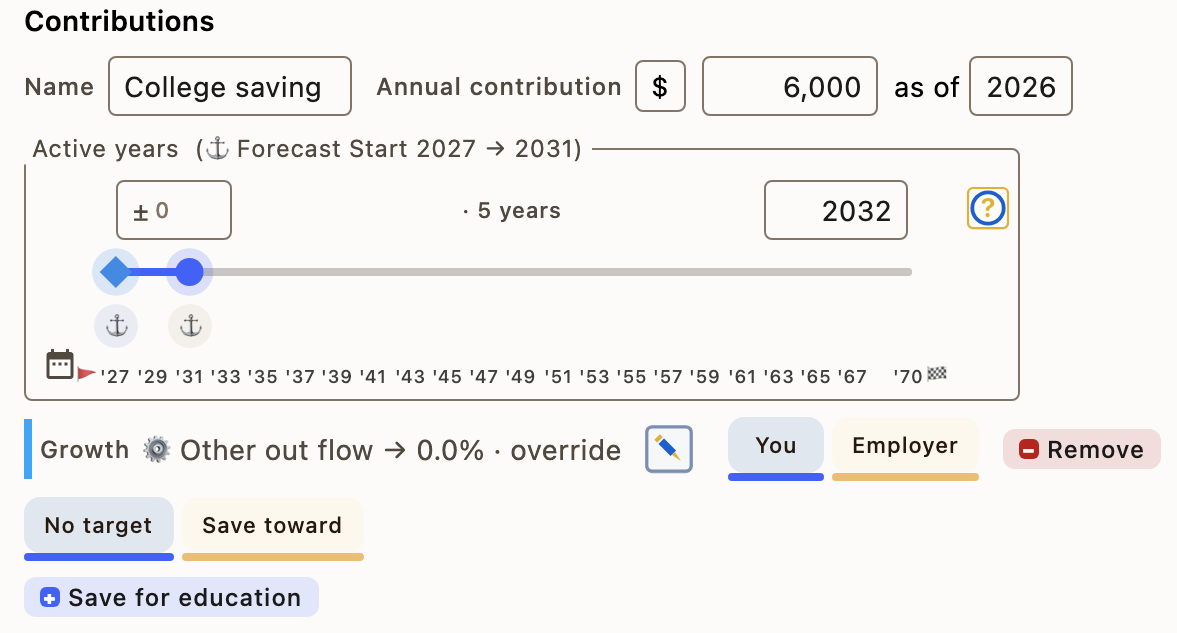
The contributions on Bart College 529. The amount is $6,000 a year, and the window ends when he starts school.
On the desktop card you can also see the safety in the Active years control: change the start year and the end stays put. An unauthored window would have run to Homer's retirement — the account owner's — long after the tuition was due, so this one names its end, and moving one endpoint does not silently drag the other.
The live plan beside this lesson is read-only for structure, so this is described rather than practised. Everything below it — what the contribution does to the balance sheet, and how far the account carries — you can read right here on the canvasWhat we call the right side of this page (or the bottom on a narrow screen) where the Tutilis application is drawn in this web Learning Center setting. It is the same product surface as the live plan — navigation, Bird's Eye, Forecaster, and so on — not a separate product.Full entry →.
The thing worth checking yourself
A contribution is a transfer, not a spend. The money leaves what the household can spend and turns up inside the 529 — it does not leave the household.
The check that shows it: net worth does not move when the saving starts. Not "moves a little" — it is the same number, because nothing was consumed and nothing was earned. The family moves $12,000 a year out of its everyday money and into the two 529s. All of it is still the family's own money, so the total the family owns stays the same.
That is why these rows appear under Transfers rather than beside groceries and the mortgage —
see Bird's EyeWhen you are not on Dossier, this control sits in the top toolbar. Opens a household overview as a modal — people, assets and liabilities, cash flow — without leaving the area you are in. Hidden on Dossier, because that same overview already sits at the top of that area. → Assets & liabilities with Cash Flow on, where a Transfers section sits
below the balance and is deliberately not part of Net = Assets − Liabilities. On
 CF ChartA Forecast Detail chip. CF = cash flows. Money in above the line, money out below, by category over the years. The net line, drawn in thick black, is net cash flow — often the thing you came for., hovering a year shows a ⇄ Transfers line under In and Out, never inside Out.
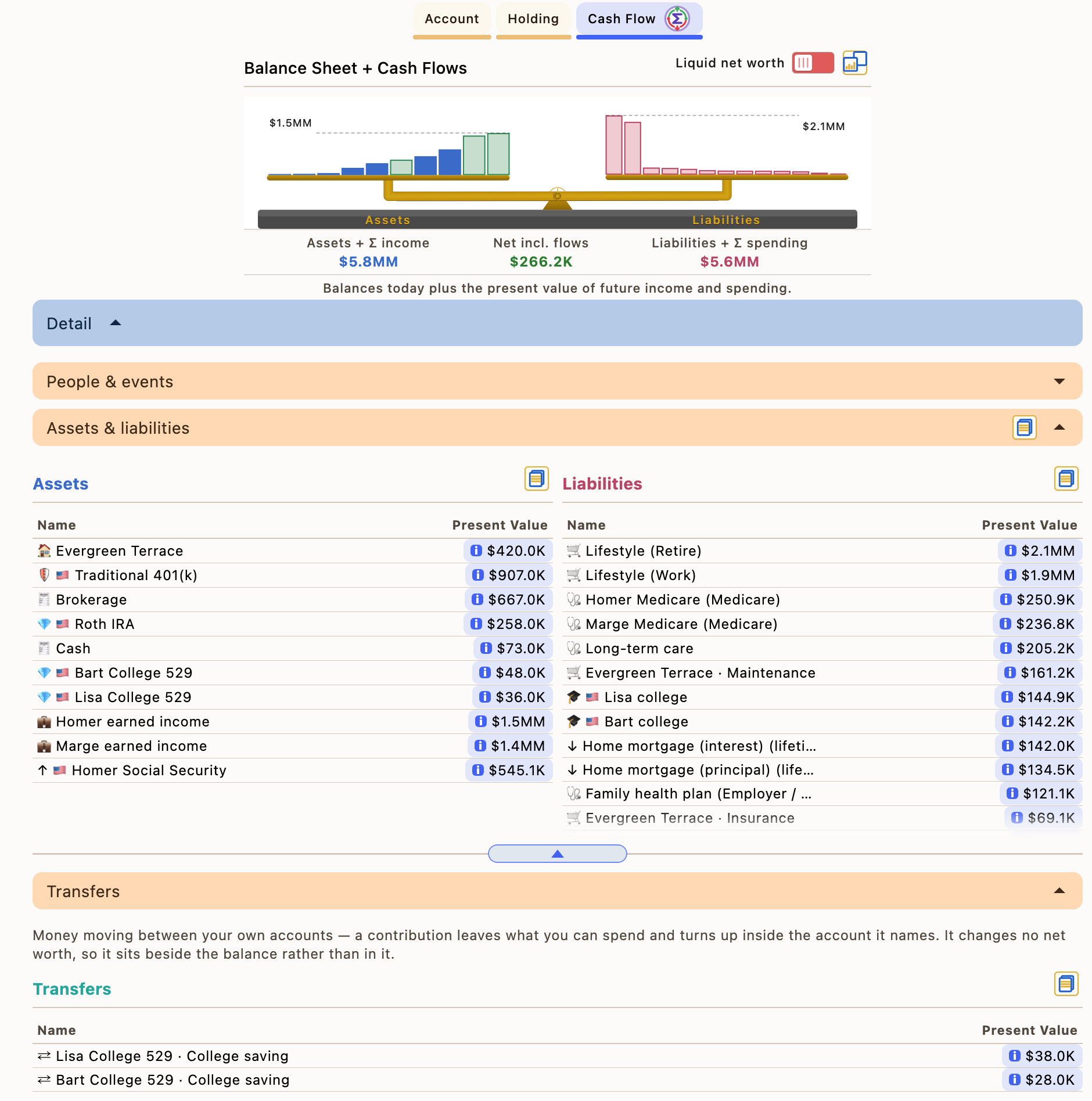
Bird's EyeWhen you are not on Dossier, this control sits in the top toolbar. Opens a household overview as a modal — people, assets and liabilities, cash flow — without leaving the area you are in. Hidden on Dossier, because that same overview already sits at the top of that area. → Assets & liabilities with Cash Flow on, Transfers expanded. Both
College saving rows sit here — in neither the Assets column nor the Liabilities column. Saving
for college is not an asset the family will receive and not a debt they owe. It is their own money
moving from one account to another, so it sits beside the balance rather than inside it.
So why bother?
If it does not change net worth, why model it — or do it? Because of the wrapper. Money inside a 529 grows without the annual tax drag it would carry in a taxable account, and qualifiedA tax word meaning the conditions were met, not a judgment of quality. A qualified Roth withdrawal is tax-free; an unqualified one is not. Qualified dividends get the lower capital-gain rates; ordinary ones do not. Whenever you see it, the interesting question is *which* conditions.Full entry → withdrawals come out federal-income-tax free. Same dollars, different tax treatment, and the gap compounds quietly over a decade. It is a real effect and a modest one at this household's scale — the wrapper is worth something, not everything.
What it actually buys: covered years
The bigger difference is not the tax break at all. It is whether the account still has money in it when the bill arrives.
Follow Bart College 529 through his four college years (2032–2035). On  ForecasterA main-rail area with two jobs: (1) run the plan year by year and inspect Forecast Detail, and (2) Simulation Summary — many paths summarized into something like a probability of success.,
open
 BS TableA Forecast Detail chip. BS = balance sheet for the selected year — real assets, accounts, liabilities, net worth. Copyable companion to BS Chart. and move the selected year from 2031 to 2035. The account is listed by
name, and its balance falls each year as tuition is paid out of it.
With $500 a month behind it, Bart's account still has money in it at the end of his second year and runs dry during his third (2034). The rest of his college is paid from ordinary household assets. Without the monthly saving, the same account would run dry during his second year. Lisa's account follows the same pattern two years later. It lasts into her third year (2036) with the saving and only into her second without it. In this plan, the saving pays for about one more year of college for each child.
That is the practical case for a 529: a funded account absorbs a large, dated, unavoidable expense instead of that expense landing on the rest of the plan.
Reading the numbers. Balances on the canvas move with the display settings: today's dollars or nominal, which forecast path is selected, and the horizon. If a number here does not match your screen, check those settings first.
| Role | Who it usually is | What it means |
|---|---|---|
| Owner (account holder) | Often a parent | Controls investments, contributions, and who the beneficiary is |
| Beneficiary | The student the account is for | The person whose education the money is intended to pay |
You can structure accounts so a child is closer to the control of the money (for example some custodial setups). That can take parents out of the decision loop once the child can act on the account — a family and legal choice, not only a tax one.
Why parents often stay as owner
- Keep the ability to change the beneficiary among eligible family members if one child does not need the full balance.
- Keep investment and withdrawal decisions with the people funding the plan.
The sample’s 529s sit on the household balance sheet with the parents’ other accounts — the usual “parent owns, child is beneficiary” story for teaching.
Older advice said “student-owned 529s crush aid.” Current federal FAFSA treatment differs:
| Situation (dependent student on the FAFSA) | Typical FAFSA asset treatment |
|---|---|
| Parent-owned 529 for the student | Reported as a parent asset |
| Dependent student–owned 529 | Also reported as a parent asset (not as a high-rate student asset) |
| UGMA/UTMA and many other student assets | Still student assets, assessed at a much higher rate than parent assets |
| Independent student who owns a 529 | Reported as a student asset |
Parent assets are assessed at a low maximum rate (commonly cited around 5.6% of countable assets in the federal formula — exact brackets and allowances change). Student assets are assessed far more aggressively (commonly cited around 20%).
Takeaways for this lesson
- For a dependent student, parent-owned vs student-owned 529 is not the old “5.6% vs 20%” story on the FAFSA — both 529 shapes generally land as parent assets.
- Control and beneficiary flexibility still favor clear parent ownership for most families.
- Putting college money in a taxable brokerageAn ordinary taxable investment account — no special retirement wrapper, no contribution limit, and no withdrawal age rules. The trade-off is that dividends and realized gains are taxed as they happen rather than deferred. Often called the taxable bucket next to traditional and Roth.Full entry → in the student’s name, or in UGMA/UTMACustodial accounts — Uniform Gifts / Transfers to Minors Act — that hold money in a child's name with an adult managing it until the child comes of age. Simple to open, but the money is the child's outright, and for financial aid it counts as a student asset, which is assessed far more heavily than a parent's.Full entry →, can still hit aid harder than a 529.
- Institutional forms (for example CSS Profile) and state rules can differ — verify with the school and current StudentAid.gov guidance.
- This app does not compute SAIStudent Aid Index — the number the FAFSA produces from a family's income and assets, which colleges use to decide how much need-based aid to offer. It replaced the Expected Family Contribution. Parent assets count lightly, student assets heavily, and retirement accounts not at all.Full entry → or package aid; treat aid as a planning constraint, not a chart on this canvas.
So if you pre-fund Bart and he needs less school, or none, what is left can often be redirected toward Lisa or another eligible relative. The money stays in the plan and keeps its tax treatment, and nobody has to take a non-qualified withdrawal.
On this sample: two separate 529 accounts and two college templates make the per-child story visible. In real life you might use one account and change the beneficiary over time, or keep parallel accounts — process and plan menus differ by state program.
Where to look: open each college template and note the Student person and the funding link to that child’s 529 account; open the account and note its Beneficiary names the same child. Point a college template at a sibling's 529 and the Issues panel warns that the student and the beneficiary disagree.
Cash-flow chart: make college a segment
On the ForecasterA main-rail area with two jobs: (1) run the plan year by year and inspect Forecast Detail, and (2) Simulation Summary — many paths summarized into something like a probability of success., open the CF ChartA Forecast Detail chip. CF = cash flows. Money in above the line, money out below, by category over the years. The net line, drawn in thick black, is net cash flow — often the thing you came for.. By default many expense categories roll into group
totals or “remaining.” Use the chart filter (segments) control and, under Expenses, turn on
College (you can leave Living & general and Health & medical on as context).
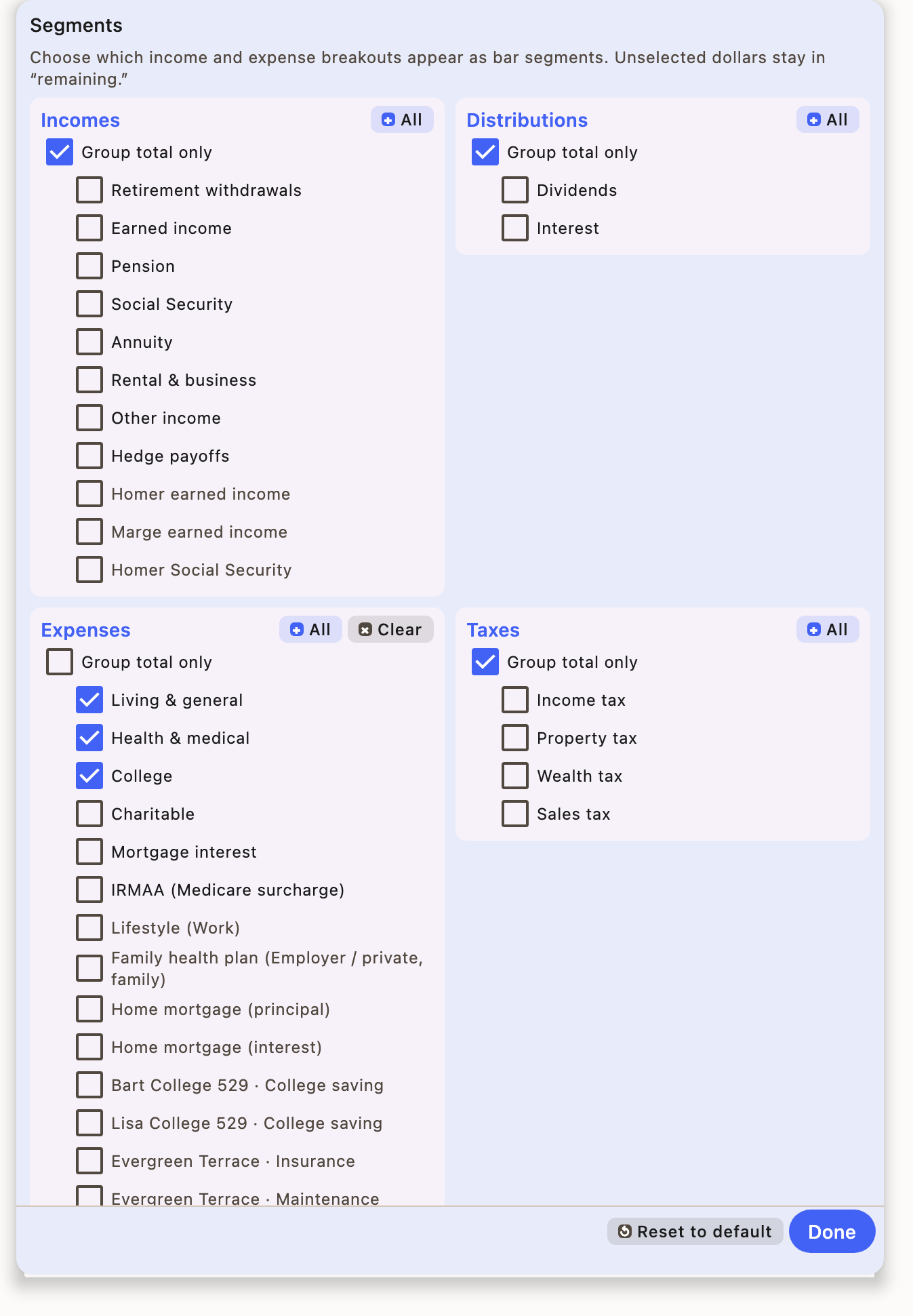
CF ChartA Forecast Detail chip. CF = cash flows. Money in above the line, money out below, by category over the years. The net line, drawn in thick black, is net cash flow — often the thing you came for. → Segments (filter). Under Expenses, select College so college is its own bar
color instead of folding into remaining.
With College selected, the outflow stack shows a blue college band in the years Bart and/or Lisa attend. Overlap years (both in school) are visibly taller in that blue segment — total college outflow roughly doubles when both kids are enrolled.
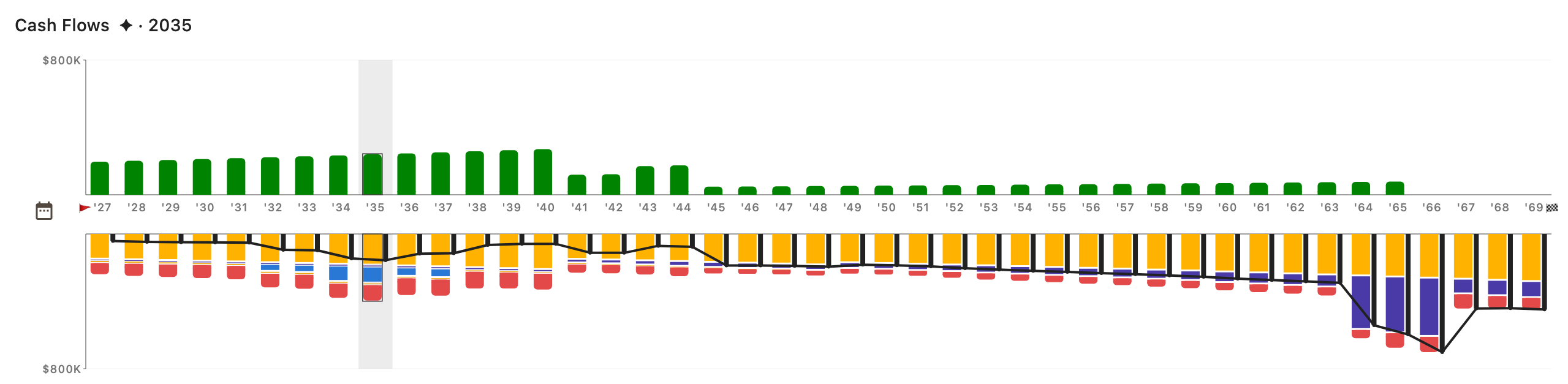
CF ChartA Forecast Detail chip. CF = cash flows. Money in above the line, money out below, by category over the years. The net line, drawn in thick black, is net cash flow — often the thing you came for. after enabling College. Blue outflow segments mark college years; the mid-2030s stack
is higher when both kids are in school.
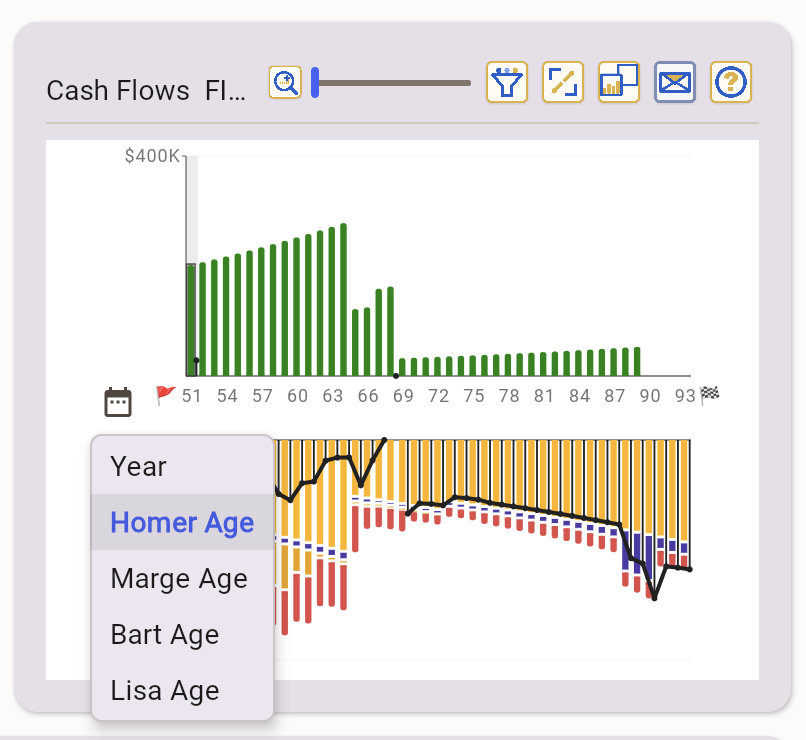
Year axis as a person’s age. On CF ChartA Forecast Detail chip. CF = cash flows. Money in above the line, money out below, by category over the years. The net line, drawn in thick black, is net cash flow — often the thing you came for., open the calendar control at the left of the
year labels and choose Bart Age (or Lisa). The axis now shows his age instead of the calendar
year. The chart starts at the plan’s first year, when Bart is about 13, so that is the number at
the left edge. Move along the axis to 2032, his first college year. The label there reads
18, and that is where the blue college band begins.
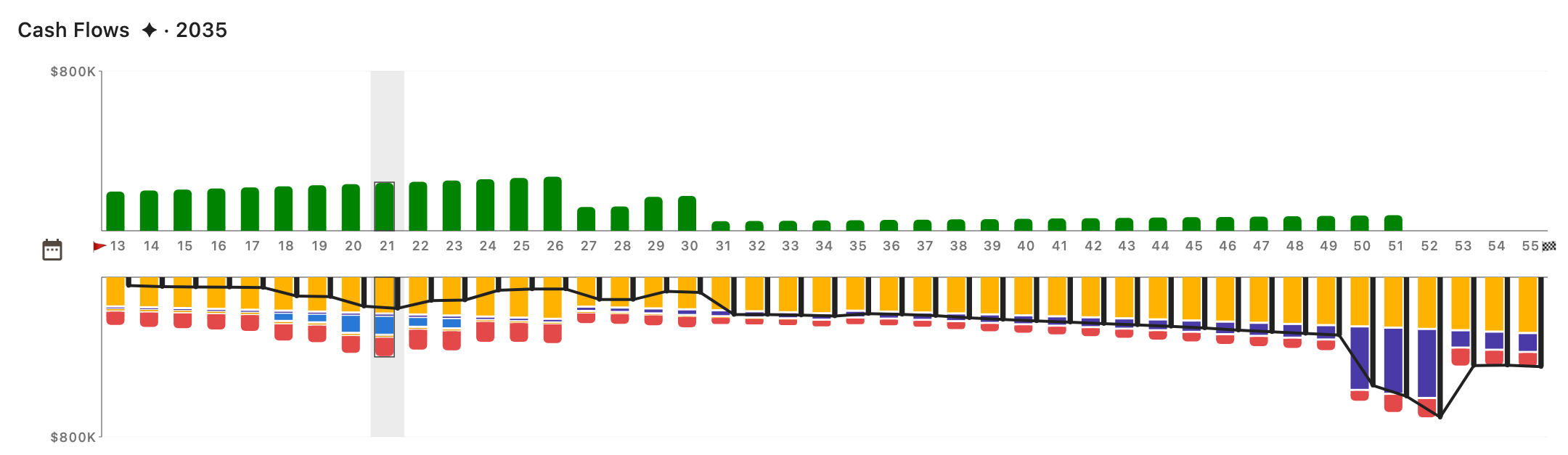
The year axis is Bart Age, and College is its own segment. The college window lines up with about age 18.
Chart + table together — turn on  CF TableA Forecast Detail chip. CF = cash flows for the selected year — incomes, expenses, taxes, and invest / sell / borrow totals. beside CF ChartA Forecast Detail chip. CF = cash flows. Money in above the line, money out below, by category over the years. The net line, drawn in thick black, is net cash flow — often the thing you came for. (Custom layout). Pick a year
when both are in school (e.g. 2035): the table breaks out College with Bart college and
Lisa college lines and dollar amounts next to the same year’s chart highlight.
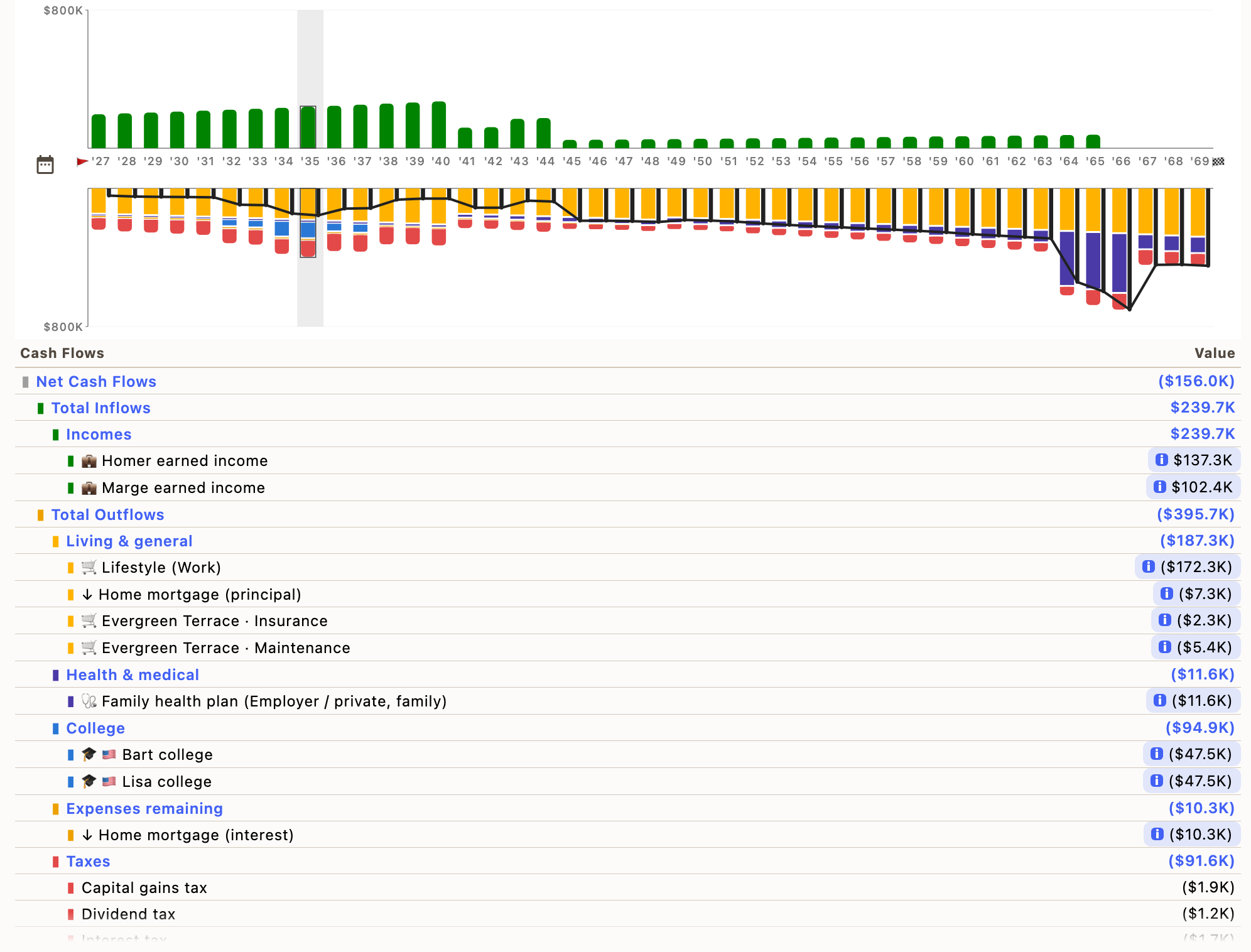
Forecaster CF ChartA Forecast Detail chip. CF = cash flows. Money in above the line, money out below, by category over the years. The net line, drawn in thick black, is net cash flow — often the thing you came for. + CF TableA Forecast Detail chip. CF = cash flows for the selected year — incomes, expenses, taxes, and invest / sell / borrow totals. (example year 2035). College totals both kids;
individual Bart college / Lisa college rows show the split.
Under SECUREThe law (and its sequel) that moved several retirement-account rules: the age RMDs start, catch-up contributions, and how quickly an inherited account must be emptied. Its practical effect on a plan is that dates you may remember from a decade ago are no longer the dates.Full entry → 2.0, unused 529 money can sometimes move into a Roth IRA for the beneficiary, not as unlimited free Roth funding. The valve is deliberately small. The account has to be old, the money has to have been in it for years, each year's move is held to the Roth contribution limit, and the whole lifetime total is capped at $35,000.
Reference — the rollover conditions
| Condition | Typical rule of thumb |
|---|---|
| Account age | 529 must have been maintained for the beneficiary for at least 15 years |
| Seasoning of money | Amounts (and earnings) from contributions in the last five years are generally ineligible |
| Annual limit | Rollover counts against the beneficiary’s annual Roth IRA contribution limit for that year |
| Lifetime cap | $35,000 lifetime per beneficiary (aggregate from 529s into Roth IRAs) |
| Whose Roth | Roth must be owned by the 529 beneficiary |
| Earned income | Beneficiary still needs compensation (and other usual Roth contribution rules that apply) |
These are rules of thumb. Verify current IRS and plan rules before acting.
So a 529 is primarily an education vehicle with a capped retirement-side relief valve — useful against “what if they don’t go,” not a substitute for maxing workplace retirement accounts first.
Related product lesson on conversions of traditionalA retirement account where the tax is paid on the way out — not a description of an old-fashioned account. Money went in before income tax, grew untaxed, and is taxed as ordinary income when you take it out — traditional 401(k)s and IRAs work this way. The contrast is Roth (taxed going in, tax-free coming out) and taxable (brokerage, taxed as you go).Full entry → retirement money (different mechanism): Roth conversion in the window.
Some state 529 menus charge fees in ways that make each investment option in an account costly (details vary widely by program — always read your plan’s fee schedule).
In this section, growth means stock funds, which can rise more over time but swing harder along the way. Ballast means steadier holdings such as bond or stable-value funds. The word comes from sailing, where ballast is the weight low in a ship that keeps it steady.
Idea: suppose you want roughly 60% growth / 40% ballast for two young children and the plan charges a noticeable fee per fund option held. Putting 60/40 in each child’s account can mean four fee-bearing options. Putting mostly growth in one child’s account and mostly ballast in the other’s can keep a similar household risk mix with fewer options — if the plan’s fee design rewards that.
| Approach | Household mix | Fee risk (when fees are per option) |
|---|---|---|
| 60/40 in Bart’s 529 and 60/40 in Lisa’s | Same overall tilt | More options → potentially higher fees |
| ~100% growth in Bart’s + ~100% ballast in Lisa’s | Similar overall tilt | Fewer options → potentially lower fees |
This sample does not model plan fees; both 529 holdings are simple equity blends for teaching structure. The fee point is a real-world checklist item, not a chart claim.
Orient the household
- Bird's EyeWhen you are not on Dossier, this control sits in the top toolbar. Opens a household overview as a modal — people, assets and liabilities, cash flow — without leaving the area you are in. Hidden on Dossier, because that same overview already sits at the top of that area. → People & events — find Bart’s and Lisa’s short college bars on the timeline.
- Bird's EyeWhen you are not on Dossier, this control sits in the top toolbar. Opens a household overview as a modal — people, assets and liabilities, cash flow — without leaving the area you are in. Hidden on Dossier, because that same overview already sits at the top of that area. → Assets & liabilities with Cash Flow — find the two College 529 assets and
Bart college / Lisa college on the liability side; hover for funding link and sparkline.
- Toggle the Σ chip on the Cash Flow selector — each college line goes from the authored $32k to about $140k (four years, summed in plan-start dollars) while lifestyle stays in the millions.
- DossierA main-rail area. Where the household plan is defined — people, assets and liabilities, cash flows. In these lessons you mainly view; on desktop you enter and edit your own plan. → Assets — open each College 529; balances are a partial pre-fund, not a full
four-year ride at sticker. Scroll to Contributions and note $6,000/yr with an Active years
end of 2032 (Bart) / 2034 (Lisa) — saving stops when school starts.
- Bird's EyeWhen you are not on Dossier, this control sits in the top toolbar. Opens a household overview as a modal — people, assets and liabilities, cash flow — without leaving the area you are in. Hidden on Dossier, because that same overview already sits at the top of that area. → Assets & liabilities with Cash Flow — open the Transfers section below
the balance. Both College saving rows are there, and in neither Assets nor Liabilities: the
family is not richer for having saved, and owes nobody for it.
- CF ChartA Forecast Detail chip. CF = cash flows. Money in above the line, money out below, by category over the years. The net line, drawn in thick black, is net cash flow — often the thing you came for. — hover any year before 2032 and read the ⇄ Transfers line. It sits under In
and Out rather than inside Out, so Net is what the household could actually have spent.
See college on the cash-flow path
- ForecasterA main-rail area with two jobs: (1) run the plan year by year and inspect Forecast Detail, and (2) Simulation Summary — many paths summarized into something like a probability of success.CF ChartA Forecast Detail chip. CF = cash flows. Money in above the line, money out below, by category over the years. The net line, drawn in thick black, is net cash flow — often the thing you came for. — open Segments (filter) and enable Expenses → College so college
is a blue band, not only “remaining.”
 Year axis
 A calendar icon on year-axis charts (lower left of BS Chart, CF Chart, and peers). Opens Year (calendar years, the default) or {Name} Age. Relabels the year line only — it does not change which year the header Year slider has selected. Same control on every year-axis chart. → Bart Age. The axis starts near 13, his age in the plan’s first year.
Move to 2032, the first college year, and it reads 18.
- Notice years when both kids are in school: the college band is roughly twice as tall.
- Open CF TableA Forecast Detail chip. CF = cash flows for the selected year — incomes, expenses, taxes, and invest / sell / borrow totals. next to the chart and pick an overlap year (e.g. 2035) to read Bart and Lisa
line by line.
College cost vs retirement room (Transforms)
The goal here is to feel how college outflows trade off against later net worth and success — direction of travel, not a single “right” dollar amount.
- Open
 TransformsA main-rail area. The name is Transforms because you transform a copy of the plan — a what-if — without rewriting the original dossier. Compare original vs modified side by side. → Modifications. Under Modifiables, select Bart college. The strategy
panel shows annual cost, start year, and years of attendance; a small expense preview shows
the four red outflow ticks on the horizon.
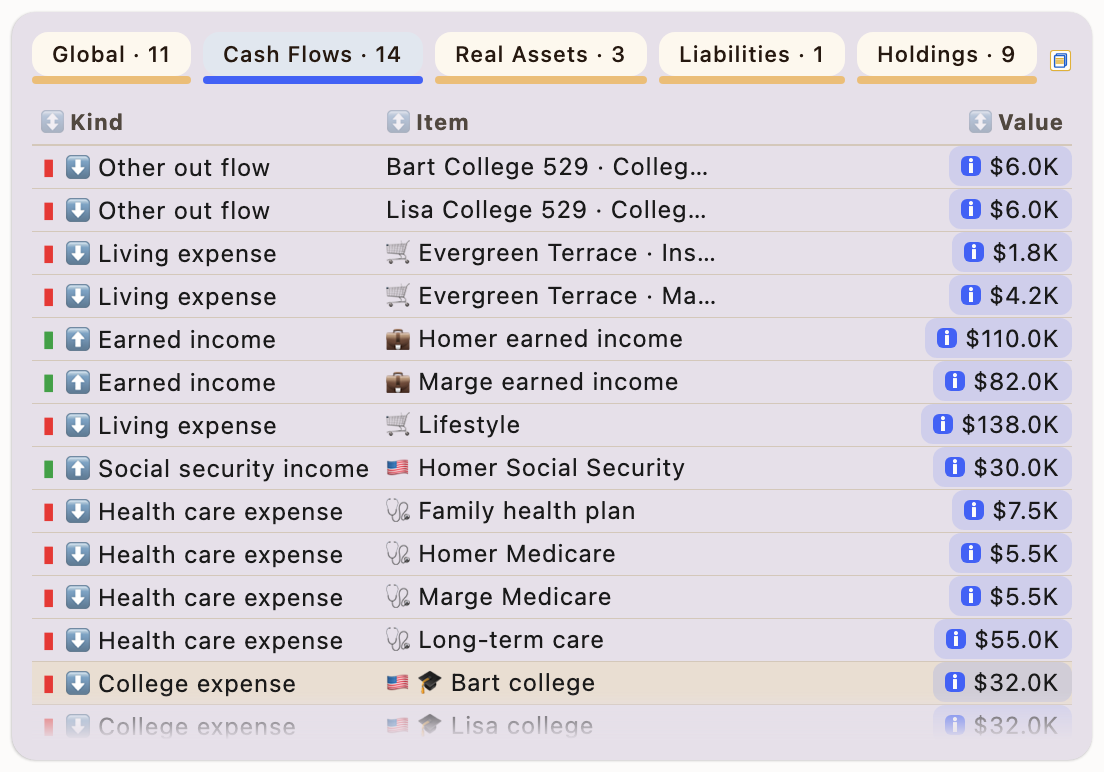
Transforms → Bart college. Strategy knobs (annual cost / start / years) and a compact preview of when the expense hits the plan.
- Slide annual cost down and watch the balance sheet on the modified side bend up toward the right end of the horizon — less paid for college leaves more room later. Slide annual cost all the way to $0 (as if Bart did not attend). Original vs modified BS charts show the retirement-era stack higher when that outflow is gone.

Original (the sample) beside Modified (Bart's college cost at zero). The modified path ends higher when that multi-year college block is removed.
- Use the ForecasterA main-rail area with two jobs: (1) run the plan year by year and inspect Forecast Detail, and (2) Simulation Summary — many paths summarized into something like a probability of success. bottom gripper to shorten Forecast Detail (or collapse it), then open
Simulation Summary and run / re-simulate if needed. Compare Original vs Modified
success and the net-worth distributions.
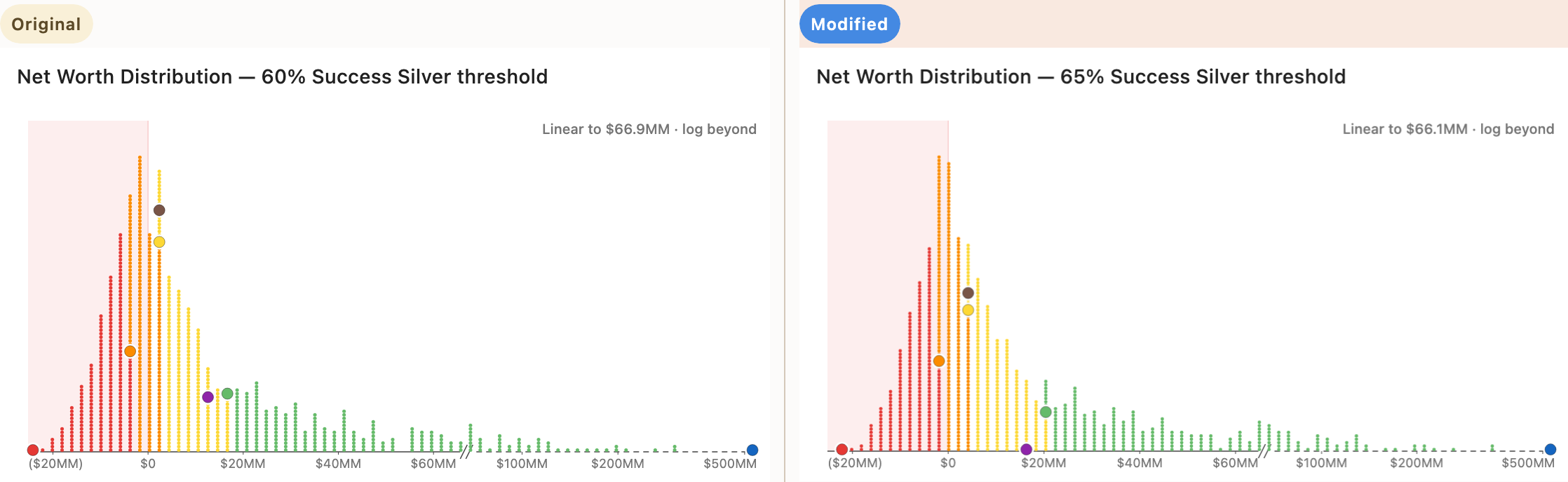
Net worth distribution after Bart's college cost is set to zero. The modified half's success share is higher — more of the cloud sits in the successful region without that expense. Read the shares the two headings print.
-
If the distribution shows “Outliers squashing the dots? Reveal”, try Reveal when you want a clearer view of the shape (display only; it does not change the plan).
-
Hit the revert control on the modification panel
 to restore Bart college to the sample’s original strategy.
-
Now ask the opposite question: what if Bart needs five or six academic years? Set Years to 6 (attendance spans longer), re-simulate, and compare success and the balance-sheet path again. Extra years add cost, bend net worth down, and can lower success versus the four-year baseline.
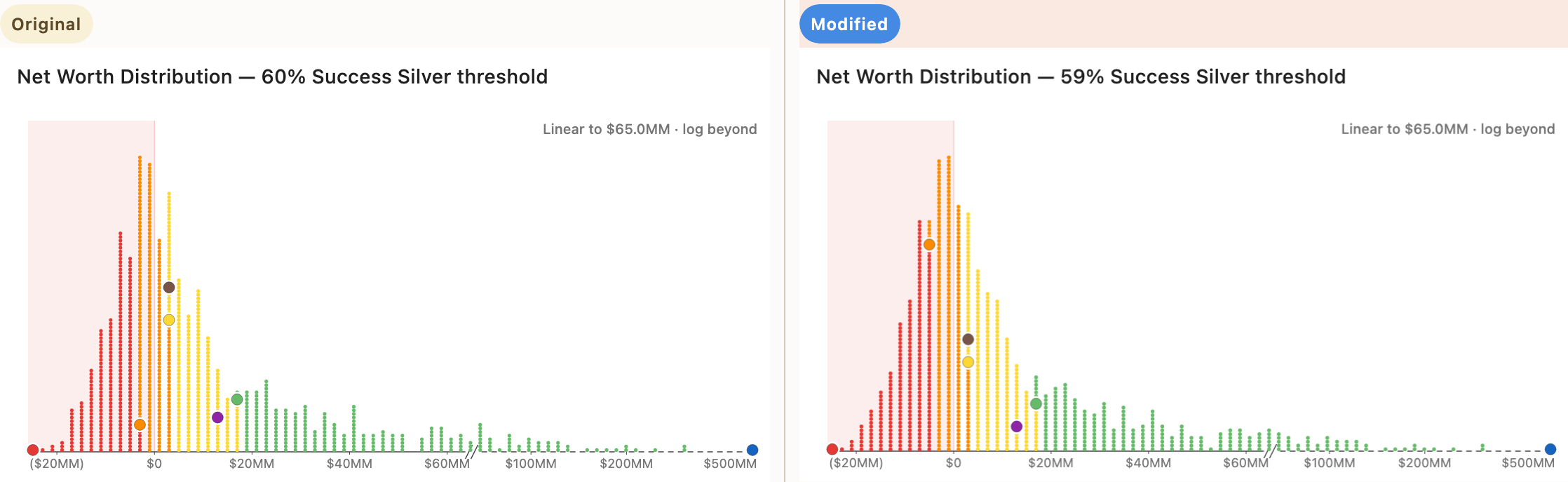
Six years of Bart college at the same annual cost. Success can move the other way, and the modified balance sheet grows more slowly. Read the success shares the two headings print.
- Side-by-side BS charts can look similar at a glance. For a closer read, open the balance sheet in combine mode (one chart with Original / Modified chips). Hover or select Original to see net worth on the four-year baseline; then Modified for the six-year path. Flipping the chips makes the impact of those two extra years on terminal NW easier to see than scanning two separate panes.
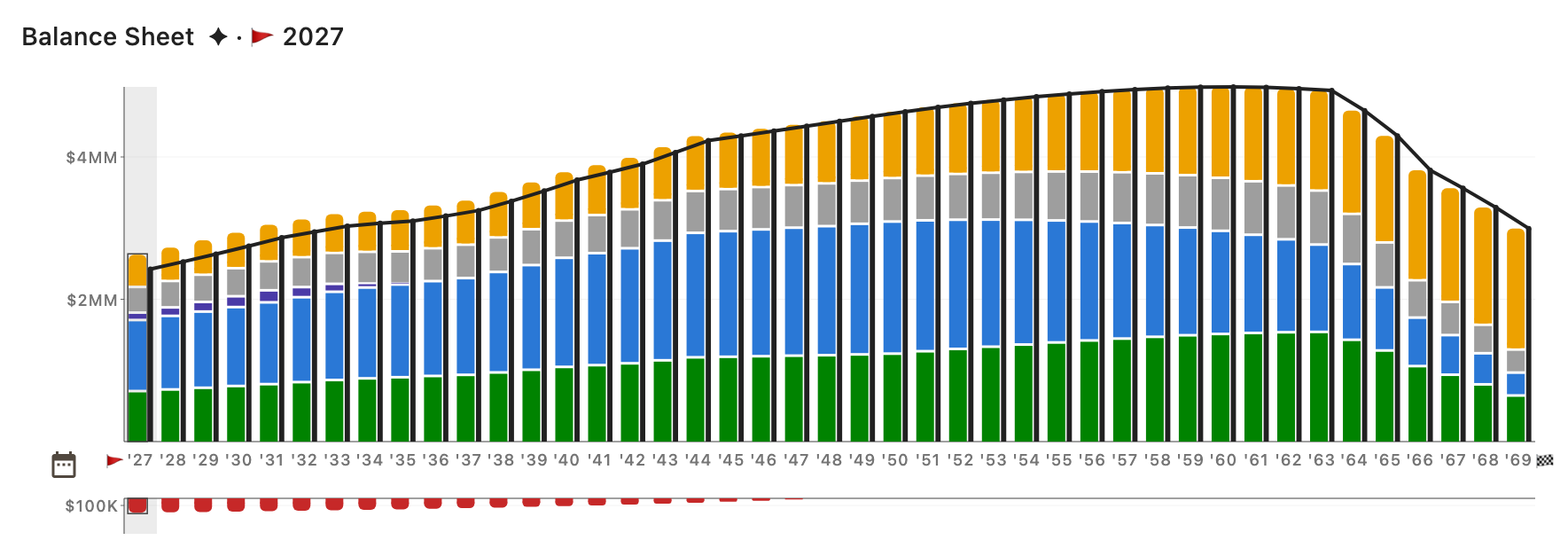
The four-year plan's balance sheet, before lengthening Bart's college.
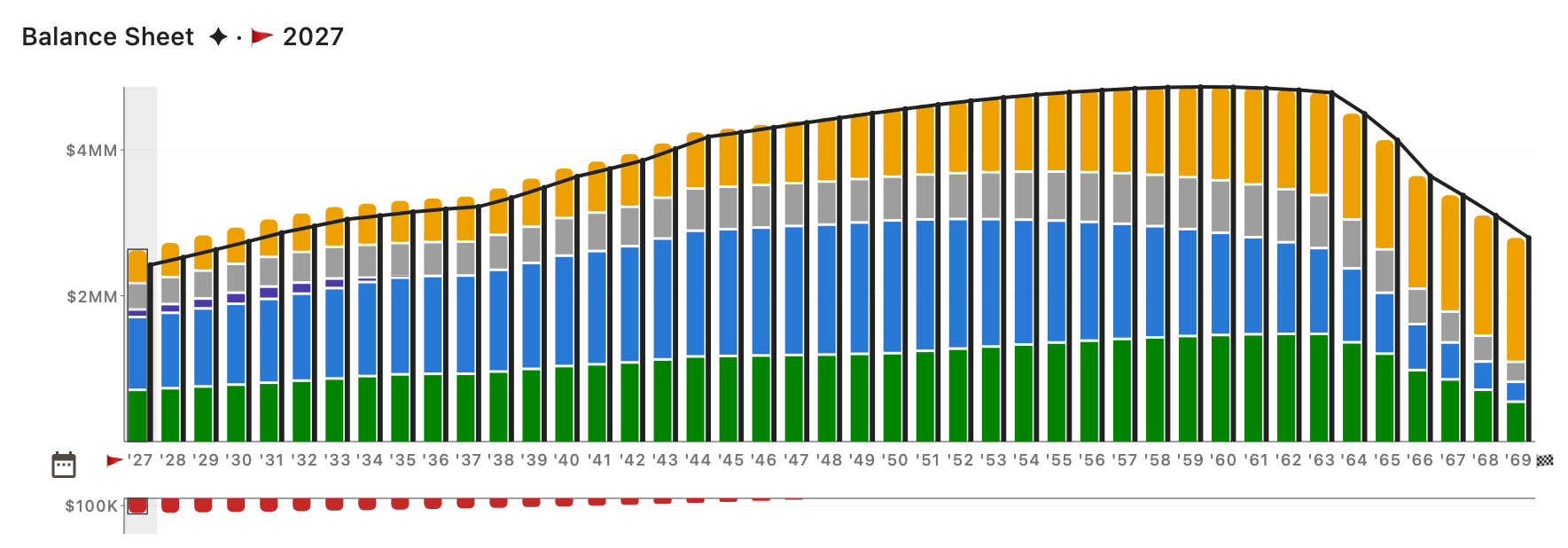
The six-year plan's balance sheet. The net-worth line sits lower through the later years — those two extra college years show up as less wealth left for retirement.
Use these as sensitivity demos on this sample, not predictions for your household. Your 529 balances, aid, and school path will move the numbers; the product habit is the same — change one lever, read BS / success direction.
| Not this | Why |
|---|---|
| A recommendation of a specific state 529 | Menus, fees, and state tax treatment differ |
| A financial-aid award estimate | FAFSA / Profile / schools are outside this canvas |
| A promise that 529→Roth always works | 15-year, 5-year, annual, and $35k limits apply |
| Full tax simulation of every 529 rule | Engine focuses on account type, growth, and linked funding |
| Topic | Lesson |
|---|---|
| Meet the household without kids on the plan | Meet the Springfield household |
| How everyday living costs change the whole plan | Bend the plan with living spend |
| Traditional → Roth conversion policy (retirement) | Roth conversion in the window |
| App map | Getting around the app |
Rebuild this plan by hand
The cards on the canvas show the accounts and cash flows. These are the settings that live outside any card, read from the plan itself, with the label each control carries in the app. A value marked default is one to leave alone.
| Setting | Springfield College 529 |
|---|---|
| Household | |
| Planning region | United States (default) |
| Homer (Primary) | |
| birth year | 1976 |
| retirement age | 65 |
| death age | 90 |
| Marge (Secondary) | |
| birth year | 1978 |
| retirement age | 67 |
| death age | 92 |
| Bart (Dependent) | |
| birth year | 2014 |
| retirement age | — |
| death age | — |
| Lisa (Dependent) | |
| birth year | 2016 |
| retirement age | — |
| death age | — |
| Taxes | |
| Tax regime | United States |
| Filing status | Married, filing jointly |
| State of residence | Ohio |
| First-year federal estimate | — |
| First-year state estimate | — |
| Strategy | |
| Residual withdrawal strategy | Pro-rata (default) |
| Roth conversions | Off |
| Definition of success | Liquidity crises allowed (default) |
| Glide path target | None (default) |
| Advanced | |
| Reporting inflation | Assumption set's rate (default) |
| Cost of capital | Assumption set's rate (default) |
| Growth assumptions | Growth overrides (default) |
| Currencies | Multiple currencies (default) |
| Default currency | USD (default) |
| Display currency | USD (default) |

Educational content — not advice. These lessons teach how Tutilis models a plan and how to read what it shows. The households, balances, and outcomes in them are invented for teaching. Nothing here is financial, investment, tax, or legal advice, or a recommendation to buy, sell, or hold anything. A model cannot know your circumstances — check anything you take from a lesson against your own situation, and against a qualified professional where it matters.