
 Selling the business when you retire
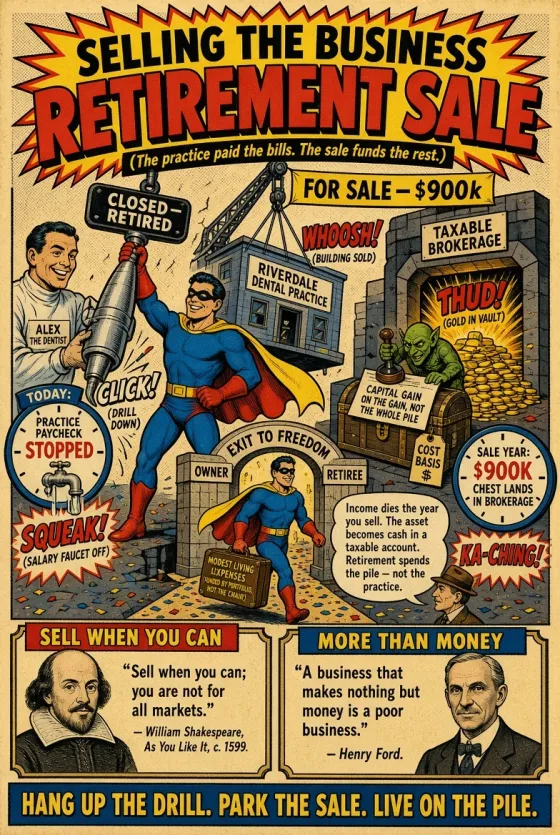
The situation Alex owns a dental practice that pays the bills today and is worth about $900k. What does the plan look like if the practice is sold the year Alex retires, and where does the money go?
How to use this case study
New to the Learning Center, or want a map of the panels? Start with a tour: Reading Lesson (Getting Around) or Screencast Lesson (Getting Around) — both walk through Tutilis next to a live planThe running Tutilis product next to this lesson — navigation, Bird's Eye, Forecaster, tools, and more — loaded with a teaching sample. A dossier is the plan data; the live plan is the full product surface with a sample dossier already open so you can explore. On the web, teaching samples are not editable the way your own dossier will be in the full app.Full entry → (to the right on a desktop-width screen, or below when stacked on a tablet).
This page — Selling the business when you retire — includes a live sample planThe running Tutilis product next to this lesson — navigation, Bird's Eye, Forecaster, tools, and more — loaded with a teaching sample. A dossier is the plan data; the live plan is the full product surface with a sample dossier already open so you can explore. On the web, teaching samples are not editable the way your own dossier will be in the full app.Full entry → next to the text. On a wide screen it usually sits to the right of the text; on a tablet it usually sits below. Use the text for the walk-through, then try the same ideas in the live plan.
The live planThe running Tutilis product next to this lesson — navigation, Bird's Eye, Forecaster, tools, and more — loaded with a teaching sample. A dossier is the plan data; the live plan is the full product surface with a sample dossier already open so you can explore. On the web, teaching samples are not editable the way your own dossier will be in the full app.Full entry → next to this page — usually to the right on a wide screen, or below on a tablet — is Tutilis running a teaching sample: the same financial planning product available as a desktop application (early preview). A dossierYour full plan in Tutilis: the people in the household, what they own and owe, cash flows in and out, tax setting, and planning assumptions. One dossier is one complete situation as the product models it.Full entry → is the plan data; the live plan is the full product (navigation, Bird's Eye, Forecaster, tools) with a sample dossier already open so you can try the panels. See planned pricing. On the web, Learning Center samples are not editable the way your own dossier will be in the full app. Your own household goes in the Tutilis desktop app — the Learning Center front page has a short clip of that.
Alex is a dentist who owns the practice. The practice pays the household's bills today, and it is also the largest thing Alex owns. A plan that only carried the earnings would say the income stops at retirement and nothing else happens. A plan that only carried the practice as an asset would let it sit on the balance sheet forever, growing quietly, never sold. This lesson carries both, and ties them together: the practice is a real asset with a planned sale in the retirement year, and the earnings are linked to it, so the sale ends them. Selling a business at retirement brings a tax bill in that year too, and the lesson shows where it lands.
Open the  DossierA main-rail area. Where the household plan is defined — people, assets and liabilities, cash flows. In these lessons you mainly view; on desktop you enter and edit your own plan. and look at the balance sheet first, then the cash flows. The rest of the
lesson walks the forecast through the year of the sale and the year after it.
Under Other real assets on the balance sheet there is a Dental practice with the category Business interest. It is valued at what it could be sold for, and it carries a purchase amount, which is what the gain on a sale is measured against.
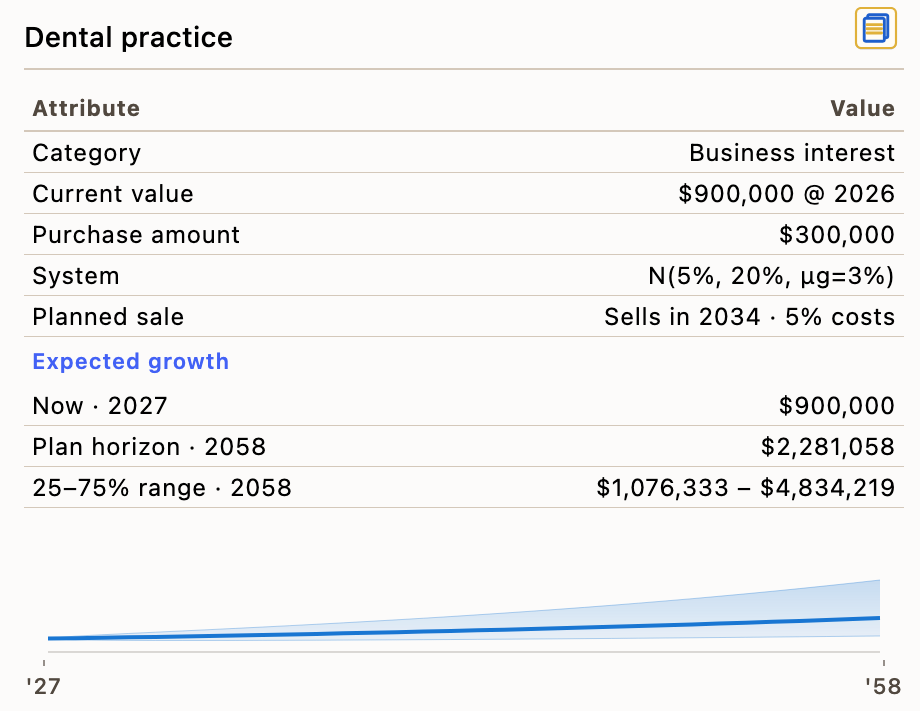
The card's last row is the point of this lesson. Planned sale says the practice sells in the year Alex retires, with five percent of the price going to a broker. The year is anchored to the retirement rather than typed as a number, so moving the retirement age moves the sale with it.
Under Cash Flows, the household's income is a single Self-employment line, Practice earnings, of $180,000 a year in today's money. There is no wage line beside it. A dentist who owns the practice draws its net earnings, and that is the whole of the income.
The earnings editor has a Business picker, and it names the dental practice. That link is what lets the sale end the income. Without it the plan would sell the practice and keep collecting its earnings, which is the kind of quiet contradiction a plan should not be able to hold.
Open the  CF TableA Forecast Detail chip. CF = cash flows for the selected year — incomes, expenses, taxes, and invest / sell / borrow totals. on 2033. The practice earnings are the only income line, and the year
looks like every year before it: the earnings come in, living expenses and taxes go out, and what is
left is invested.
Now move to 2034, the retirement year.
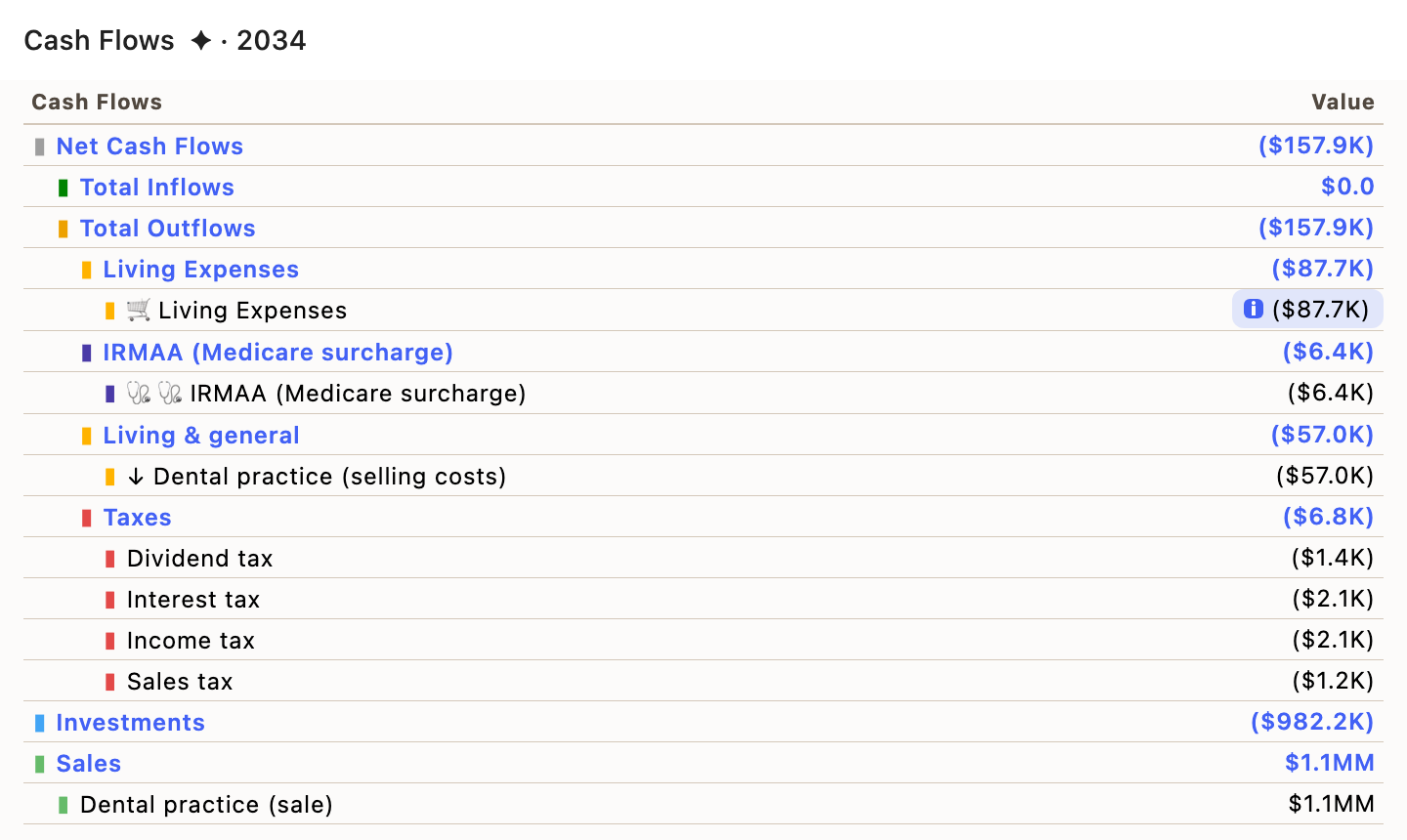
Three things have changed. There is no income at all, because the earnings ended the year before the sale. The expenses include a new line, Dental practice (selling costs), the broker's five percent. And the price of the practice appears under Sales rather than under incomes, because a sale is not income: the household swapped an asset for cash, and its net worth moved by the costs alone. Almost all of that cash is reinvested the same year, which is the large Investments line.
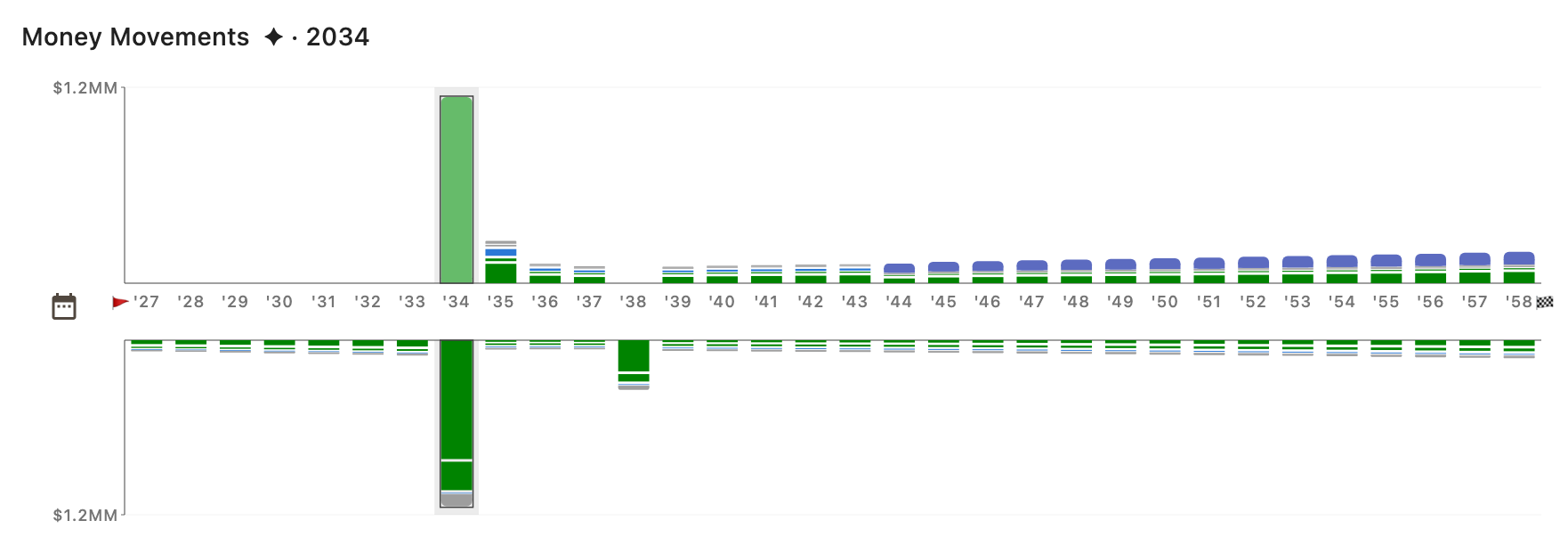
The  Moves ChartA Forecast Detail chip. Mov = Movements. Chart of sales, invest, and borrow over the years — how the operating net is closed. shows the same year as one tall bar above the axis, the sale, and the
reinvested proceeds below it.
Move one more year, to 2035.
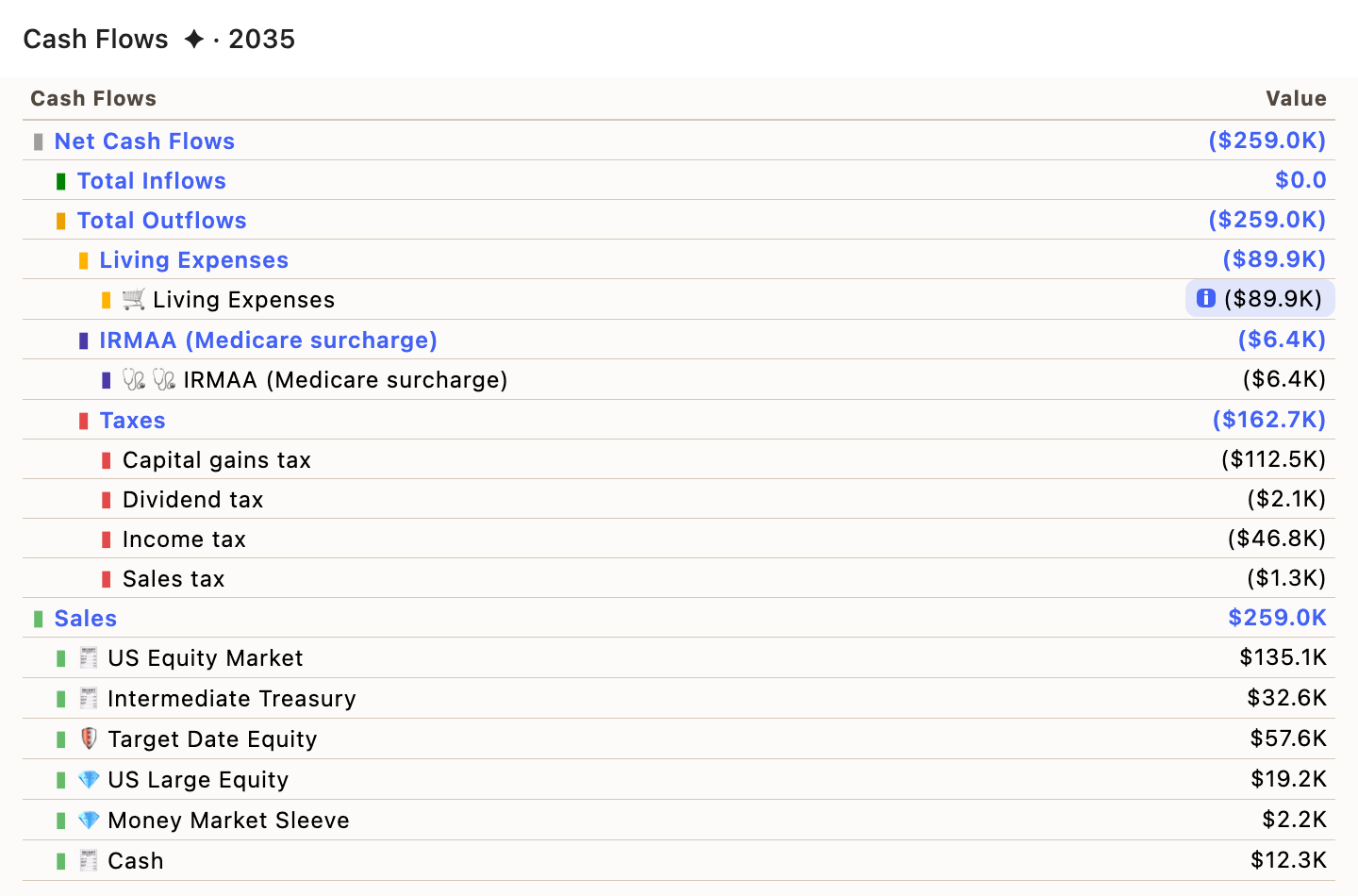
The tax on the sale arrives here. The forecast pays the tax on earnings during the year they are earned, the way withholding and quarterly estimates do, which is why 2034 has almost no tax line: the practice's last year was paid for in 2033. Tax on income that nobody withholds from, such as a sale, is settled with the next year's tax payment, and the gain on the practice, the price less the costs and the purchase amount, is a long-term capital gain on the 2034 return. There is still no income, so the bill is paid the way any retiree pays a bill with no paycheck: holdings are sold. The Sales section in 2035 lists the funds that were sold to cover it, and most of them were bought with the practice's own proceeds the year before.
The plan also carries an Inheritance of $250,000 in today's money, arriving in 2038. It is authored as a Windfall cash flow: one amount, one year, and a choice of whether the tax pass sees it. An inheritance is not income, so it arrives untaxed and is invested like any other surplus.
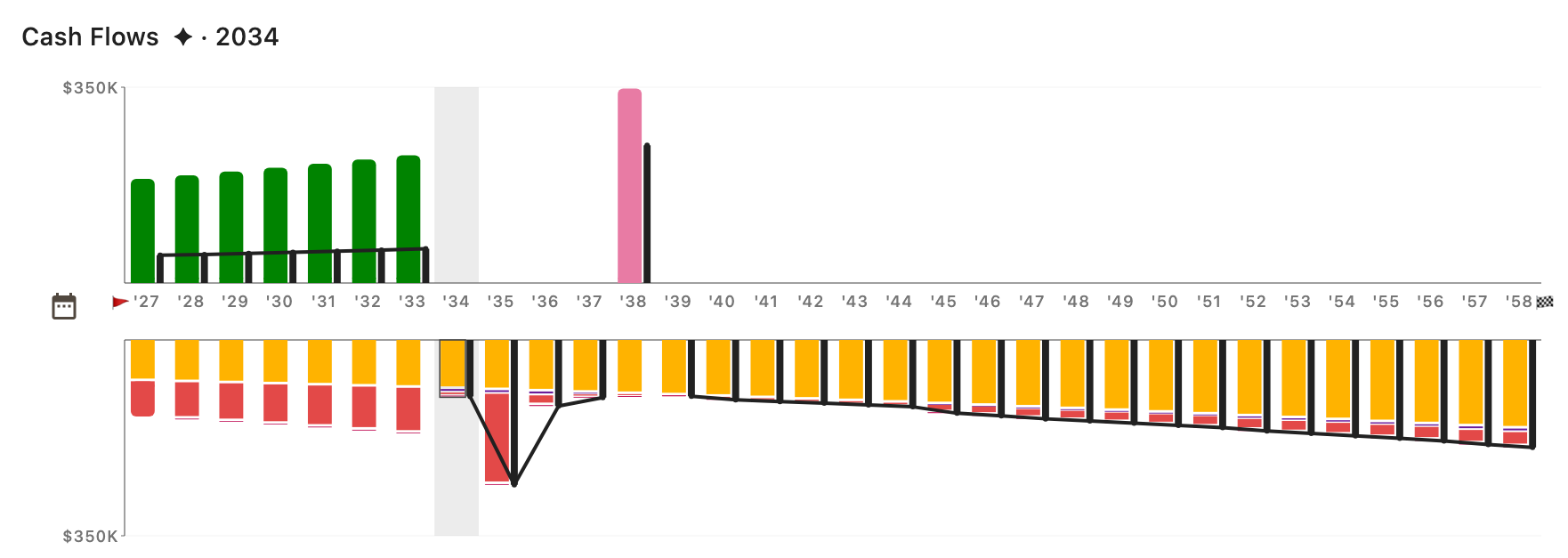
On the  CF ChartA Forecast Detail chip. CF = cash flows. Money in above the line, money out below, by category over the years. The net line, drawn in thick black, is net cash flow — often the thing you came for. the shape of the whole plan is visible at once: the practice earnings as the
only inflow until 2033, nothing at all for four years, the inheritance as a lone bar in 2038, and a
tall tax bar in 2035 that is the sale's bill arriving.
Desktop app only
Open Transforms and select Retirement & forecast end. Move Alex's retirement age. The sale year moves with it, the earnings end one year earlier or later, and the tax bill follows one year behind the sale.
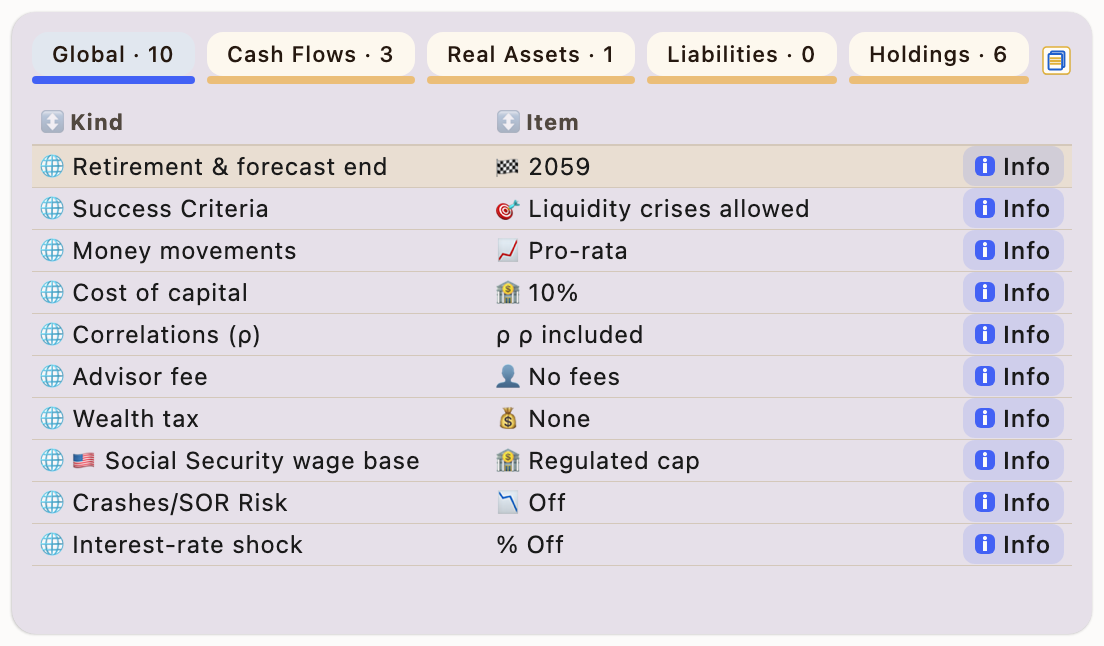
Transforms → Modifiables on this plan, Global tab, with Retirement & forecast end selected. Moving that retirement age moves the year the practice sells.
Then open the practice on the balance sheet and set Share sold to fifty percent. Half the practice sells, half keeps growing, and the earnings keep running, because only a full sale ends what the asset carries.
The plan has no Social Security and no pension, so the years after the sale live entirely on the portfolio. That is deliberate here, to keep the sale legible, and it is not how a real household would leave things. A real plan adds the Social Security generator, and the household's living expenses after retirement usually change too.
The gain is treated as a long-term capital gain in full. A real sale of a practice is often part goodwill and part equipment, and the equipment part can be taxed differently. The plan does not split it.
Rebuild this plan by hand
The cards on the canvas show the accounts and cash flows. These are the settings that live outside any card, read from the plan itself, with the label each control carries in the app. A value marked default is one to leave alone.
| Setting | Practice sold at retirement |
|---|---|
| Household | |
| Planning region | United States (default) |
| Alex (Primary) | |
| birth year | 1969 |
| retirement age | 65 |
| death age | 90 |
| Taxes | |
| Tax regime | United States |
| Filing status | Single |
| State of residence | Ohio |
| First-year federal estimate | — |
| First-year state estimate | — |
| Strategy | |
| Residual withdrawal strategy | Pro-rata (default) |
| Roth conversions | Off |
| Definition of success | Liquidity crises allowed (default) |
| Glide path target | None (default) |
| Advanced | |
| Reporting inflation | Assumption set's rate (default) |
| Cost of capital | Assumption set's rate (default) |
| Growth assumptions | Growth overrides (default) |
| Currencies | Multiple currencies (default) |
| Default currency | USD (default) |
| Display currency | USD (default) |

Educational content — not advice. These lessons teach how Tutilis models a plan and how to read what it shows. The households, balances, and outcomes in them are invented for teaching. Nothing here is financial, investment, tax, or legal advice, or a recommendation to buy, sell, or hold anything. A model cannot know your circumstances — check anything you take from a lesson against your own situation, and against a qualified professional where it matters.