This lesson uses 2 sample plans — switch anytime; color matches the bar between the columns.
On the right now: Every amount tagged

 Why every amount carries a currency
The situation Noor lives on a US salary but owns a rented condo in Tokyo, a euro savings account, and a retirement villa in Costa Rica. Why does every amount in the plan insist on naming its currency, and what happens if it doesn't?

How this page works
New to the Learning Center, or want a map of the panels? Start with a tour: Reading Lesson (Getting Around) or Screencast Lesson (Getting Around) — both walk through Tutilis next to a live planThe running Tutilis product next to this lesson — navigation, Bird's Eye, Forecaster, tools, and more — loaded with a teaching sample. A dossier is the plan data; the live plan is the full product surface with a sample dossier already open so you can explore. On the web, teaching samples are not editable the way your own dossier will be in the full app.Full entry → (to the right on a desktop-width screen, or below when stacked on a tablet).
This page — Why every amount carries a currency — can open more than one live sample planThe running Tutilis product next to this lesson — navigation, Bird's Eye, Forecaster, tools, and more — loaded with a teaching sample. A dossier is the plan data; the live plan is the full product surface with a sample dossier already open so you can explore. On the web, teaching samples are not editable the way your own dossier will be in the full app.Full entry → next to the text (to the right on a wide screen, or below on a tablet). Use the Live plans chips (and matching colored links in the prose) to switch without leaving this page; the colored bar near the plans shows which one is loaded. The walk-through stays in the text.
The live planThe running Tutilis product next to this lesson — navigation, Bird's Eye, Forecaster, tools, and more — loaded with a teaching sample. A dossier is the plan data; the live plan is the full product surface with a sample dossier already open so you can explore. On the web, teaching samples are not editable the way your own dossier will be in the full app.Full entry → next to this page — usually to the right on a wide screen, or below on a tablet — is Tutilis running a teaching sample: the same financial planning product available as a desktop application (early preview). A dossierYour full plan in Tutilis: the people in the household, what they own and owe, cash flows in and out, tax setting, and planning assumptions. One dossier is one complete situation as the product models it.Full entry → is the plan data; the live plan is the full product (navigation, Bird's Eye, Forecaster, tools) with a sample dossier already open so you can try the panels. See planned pricing. On the web, Learning Center samples are not editable the way your own dossier will be in the full app. Your own household goes in the Tutilis desktop app — the Learning Center front page has a short clip of that.
Noor lives and works in the United States. The salary is in dollars, the living expenses are in dollars, the brokerage account is in dollars. But Noor also owns a condo in Tokyo that is let to a tenant, a savings account left behind after a few years in Frankfurt, and a small villa in Costa Rica bought for retirement. Four currencies, one household, one plan. That is multi-currency financial planning, and this lesson shows how the plan carries each amount in its own currency.
If you have only ever planned in one currency, the currency dropdown beside every amount in the
plan editor can look like overkill. You type 500,000, and there is a $ USD sitting next to it
that you never touch. Why is it there at all?
This lesson is the answer. Switch between the two plans on the canvasWhat we call the right side of this page (or the bottom on a narrow screen) where the Tutilis application is drawn in this web Learning Center setting. It is the same product surface as the live plan — navigation, Bird's Eye, Forecaster, and so on — not a separate product.Full entry → as you read: they hold the same digits. The only difference is whether each amount says what it is counted in.
The Tokyo condo is worth 65,000,000. Sixty-five million of what is the whole question. Sixty-five
million yen is a modest apartment; sixty-five million dollars is a skyscraper. The digits are the
same, and nothing about them tells you which.
So an amount in Tutilis is three things, not one: a year it was quoted in, a currency it
is counted in, and the number. The year is what makes a 2024 appraisal mean 2024 money rather than
whatever year the plan starts. The currency is what makes 65,000,000 mean an apartment rather
than a skyscraper. Neither is decoration; leave either out and the number is a guess.
For a household that only ever deals in dollars, the currency costs nothing. It is the default, so you never pick it, and when the plan is saved a dollar amount does not even record a currency — "no currency stated" means US dollars. The dropdown you never touch is the whole price of the feature.
Open Dossier on the tagged plan and look at what each item says about itself. Every item carries its own currency, and nothing is converted where it is stored:
| Item | Recorded as |
|---|---|
| Tokyo condo | ¥65,000,000, quoted in 2024 |
| Tokyo condo · building management fee | ¥360,000 a year, quoted in 2024 |
| Tokyo condo rent | ¥2,400,000 gross a year, quoted in 2026 |
| Frankfurt savings | €60,000, quoted in 2026 |
| Costa Rica villa | ₡55,000,000, quoted in 2025 |
| Brokerage, salary, living expenses | dollars |
Two details are easy to miss. The condo's cost basis is a bare number, 52,000,000, with no
currency of its own — it borrows the valuation's. A basis is only meaningful against the value
it will be compared with, so the two are kept in one currency by construction, and when you change
the valuation's currency in the editor the basis follows at once. And the rent is not a
property of the condo at all; it is its own item, a rental-income generator, with its own
currency. A yen apartment could in principle be let for dollars, so the model does not assume.
"Recorded, not converted" is the rule. The plan you typed is the plan on disk. Every conversion you will ever see is computed from these native amounts and a rate, on the way to the screen.
The Bird's Eye is the first place the four currencies meet. It shows the plan's items as one list of present values, and it has to pick a single currency to do that — your display currency, dollars here:
| Item | Present value |
|---|---|
| Tokyo condo | ≈ $489,000 |
| Costa Rica villa | ≈ $95,000 |
| Brokerage | $500,000 |
| Frankfurt savings | ≈ $64,000 |
The yen condo is worth a bit less than the dollar brokerage account; the colón villa is a small
fraction of either. Each converted line carries a marker — (¥↔$), the currency it was modeled
in and then the one it is shown in — so a converted figure never passes as a native one. The
FX button on the rail lists every currency the plan holds and the rate behind each marker.
The forecast does the same thing, one level deeper. The engine simulates each item in its own currency — the condo appreciates in yen, the rent grows in yen, the management fee inflates in yen — and converts only at the edges, where a year's cash flows are netted and where a balance sheet is totaled. Set the forecaster to 2027 and read the cash-flow statement: the rent arrives as about $12,100 net of the property's expenses, beside a salary of about $155,000. That $12,100 is a yen figure that crossed the boundary once, at the plan's rate.
Taxes cross the same boundary. Noor files in the US, so the yen rent is taxed as US passive income, in dollars, on the same statement as the salary. The tax calculator picks its unit of account from the jurisdiction, not from the item — which is why the item has to say what it is in.
Now switch to Same digits, no tag. Nothing was retyped. Each amount simply stopped saying which currency it is in — which, as above, means the plan reads every one of them as dollars.
| Every amount tagged | Same digits, no tag | |
|---|---|---|
| Tokyo condo on the Bird's Eye | ≈ $489,000 | $65,000,000 |
| Net worth, end of 2027 | ≈ $1.3 million | ≈ $126 million |
| Tokyo condo rent in 2027 | ≈ $12,100 | ≈ $1.6 million |
Noor is now a nine-figure household on paper, with a condo that earns about as much in rent each year as the salary does in a decade. Success is a perfect 100%. Every table is internally consistent; every table is wrong.
Nothing in the software can catch this. 65,000,000 is a perfectly legal dollar amount, and a
plan cannot tell an untagged yen figure from a real one — they are the same bytes. The only
defense is that the amount says what it is at the moment it is typed, by the one person who
knows. That is what the dropdown is for.
This is not a hypothetical. The engine once had exactly this bug — a yen valuation read at face value as dollars, on the forecast side only, so the Bird's Eye and the forecaster disagreed by more than a hundred to one. The fix was not to convert more cleverly; it was to make every item carry its currency all the way through the simulation, and a test now holds the engine to that.
The obvious cheaper design is a single currency for the whole plan: one dropdown, in the settings, and every amount inherits it. It works exactly as long as every amount really is in that currency, and it fails the day one isn't.
Desktop app only
That dropdown is the plan's currency choice. On this plan it is set to multiple currencies, and the picker under it only seeds the next amount you type.
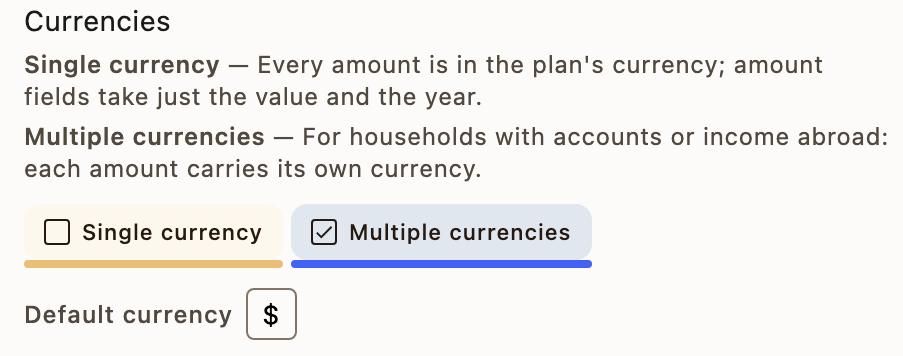
The currency choice on Every amount tagged.
Noor's plan has no honest answer to "what currency is this plan in". It is in four. The moment a single foreign item appears, a plan-level setting has to become a per-item one, and every amount already typed has to be gone back over and tagged — by someone who may no longer remember which appraisal was in which money. Amounts entered before the change and amounts entered after it are indistinguishable on disk. That is the lock-in: not that it is hard to add the field later, but that nothing entered before it can be trusted afterward.
Attaching the currency to the amount from the first day is the honest shape. It says nothing a single-currency household has to think about, and it costs a default value that is not even written down. What it buys is that the first foreign item is one more row, not a migration.
The rates behind every conversion above live on the plan. Open Assumptions → Currency to see them: one rate per currency against the dollar, so no combination of edits can be inconsistent with itself. These two plans carry no rates of their own and ride the bundled snapshot; a real plan can type its own, or press Get latest FX and fine-tune.
Desktop app only
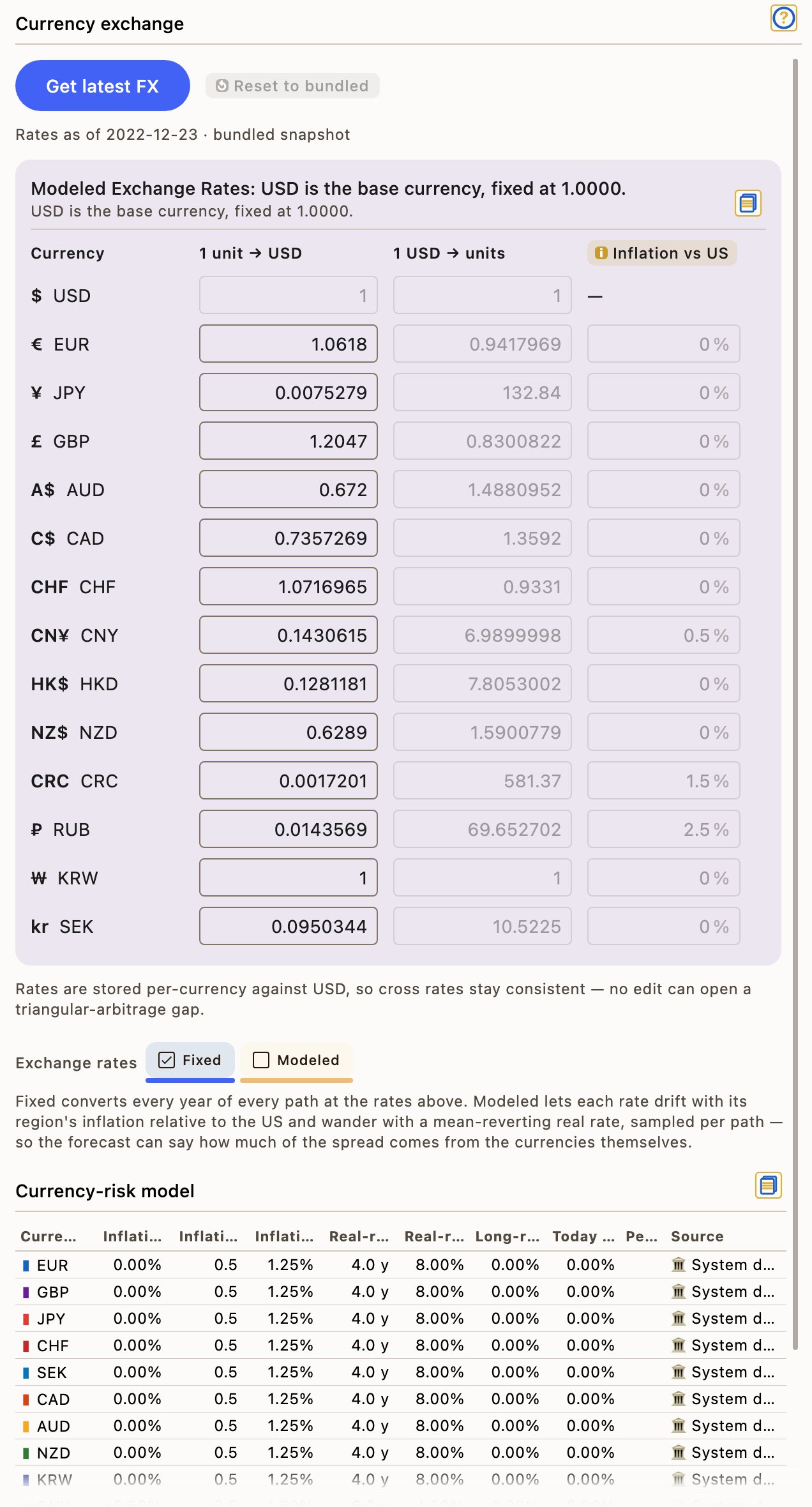
Assumptions → Currency on Every amount tagged. One row per currency against the dollar, and Exchange rates set to Fixed.
By default the rates do not move. Every year of the forecast converts at the same rate, which means a plan that has not asked otherwise treats currency as a unit and not as a risk: the yen condo grows at a real-estate rate, and the fact that the yen itself will wander against the dollar over forty years is not part of the spread. That default is deliberate, and it is exactly what every plan did before the currency-risk model existed.
The model is there when you want it. Under the rate table, the same panel offers Exchange rates: Fixed | Modeled. Choose Modeled and each rate becomes part of the simulation: it drifts with its region's inflationA rise in the price level. The same basket of goods costs more dollars than it did. A household plan carries a growth rate on each bill, because one published inflation number is one basket. The reporting rate that restates future dollars into today's dollars is a separate assumption.Full entry → relative to the US and wanders with a real rate that mean-reverts over a few years, sampled per path, so the forecast can say how much of a household's spread comes from its currencies. Because every item already carries its currency through the whole simulation, the model slots in at the conversion boundary and changes nothing about how a plan is written. The lesson Currency risk in the forecast walks through it on a household built for the purpose.
Two smaller levers exist today under TransformsWhat-if levers that change the open plan without rewriting the whole dossier from scratch — try a claim age, spend level, or similar experiment.Full entry →. Convert re-expresses an item in another currency at the plan's rate, so you can ask what the household looks like if the condo is sold and the proceeds brought home. Redenominate relabels the currency without converting — which is the honest name for what the second plan on this page did by accident.
- An amount is a number, a year, and a currency. Leave any of the three out and it is a guess.
- The currency is free when you do not need it. Dollars are the default, and a dollar amount does not even record one.
- Nothing is converted where it is stored. Conversion happens on the way to the screen and at the edges of the forecast, always from the native amount and a rate you can see.
- The same digits under the wrong tag are not a small error. They are a different household.
- Recording the currency from the first day is what makes the first foreign item a row instead of a migration — and what lets the currency-risk model slot in at the conversion boundary without touching how a plan is written.
Rebuild this plan by hand
The cards on the canvas show the accounts and cash flows. These are the settings that live outside any card, read from each plan this lesson opens, with the label each control carries in the app. A value marked default is one to leave alone.
| Setting | Every amount tagged | Same digits, no tag |
|---|---|---|
| Household | ||
| Planning region | United States (default) | United States (default) |
| Noor (Primary) | ||
| birth year | 1979 | 1979 |
| retirement age | 65 | 65 |
| death age | 90 | 90 |
| Taxes | ||
| Tax regime | United States | United States |
| Filing status | Single | Single |
| State of residence | None | None |
| First-year federal estimate | $30,000 | $30,000 |
| First-year state estimate | — | — |
| Strategy | ||
| Residual withdrawal strategy | Pro-rata (default) | Pro-rata (default) |
| Roth conversions | Off | Off |
| Definition of success | Liquidity crises allowed (default) | Liquidity crises allowed (default) |
| Glide path target | None (default) | None (default) |
| Advanced | ||
| Reporting inflation | Assumption set's rate (default) | Assumption set's rate (default) |
| Cost of capital | Assumption set's rate (default) | Assumption set's rate (default) |
| Growth assumptions | Growth overrides (default) | Growth overrides (default) |
| Currencies | Multiple currencies (default) | Multiple currencies (default) |
| Default currency | USD (default) | USD (default) |
| Display currency | USD (default) | USD (default) |

Educational content — not advice. These lessons teach how Tutilis models a plan and how to read what it shows. The households, balances, and outcomes in them are invented for teaching. Nothing here is financial, investment, tax, or legal advice, or a recommendation to buy, sell, or hold anything. A model cannot know your circumstances — check anything you take from a lesson against your own situation, and against a qualified professional where it matters.